Designing a system where AI work can’t pass for a sign-off
Designed the design system for an independent concept of Marble’s AI tax platform: foundations every new surface inherits, and a grammar for AI work that shows what Marble did and what a person checked.
- Role
- Product designDesign systemsMotionPrototyping in code
- Team
 EvanProduct designer
- Timeline
- Sep 24–30, 2026
Marble is an AI-native tax platform for CPAs, tax preparers and reviewers. Its promise, as I read it: AI does the work, and the professional stays in control.
When AI does the work, the hard part becomes knowing what a person actually checked. So I designed a system with two jobs: foundations every new Marble surface inherits, and a grammar for AI that makes Marble’s work impossible to mistake for a professional’s sign-off.
I’m not affiliated with Marble, and every client and number here is fictional.
Marble’s screens don’t yet say who did the work
Marble already reads a client’s uploads, then identifies, renames and files each one.
And a person still signs. The client’s file has to defend itself in an exam or a peer review years later, and liability doesn’t move to the software.
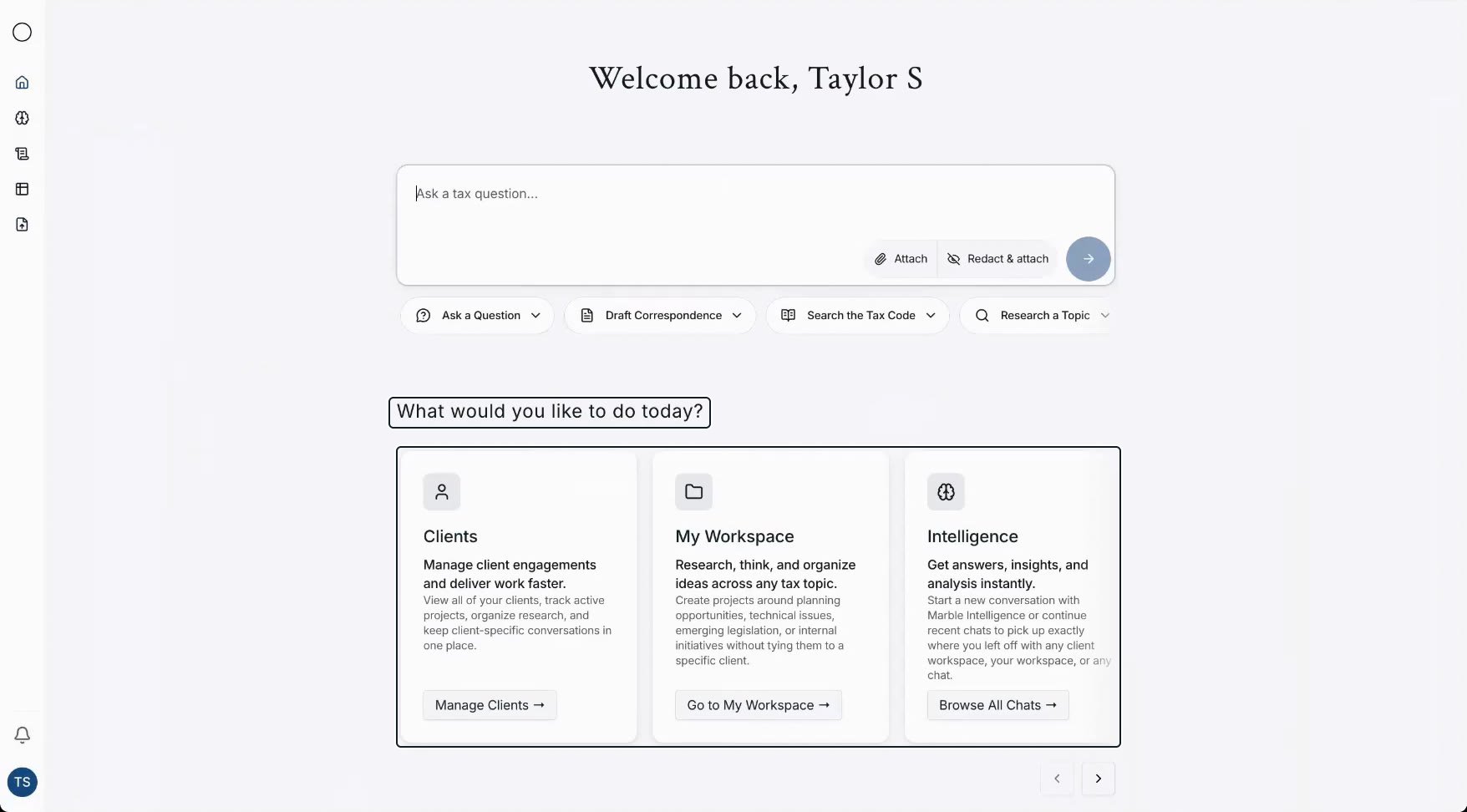
So every screen has to answer one question fast: did Marble do this, or did a person? I studied how the screens in Marble’s public demo video answer it today.
Home explains instead of directing. Three large cards describe Clients, My Workspace and Intelligence. Nothing says what needs you today.
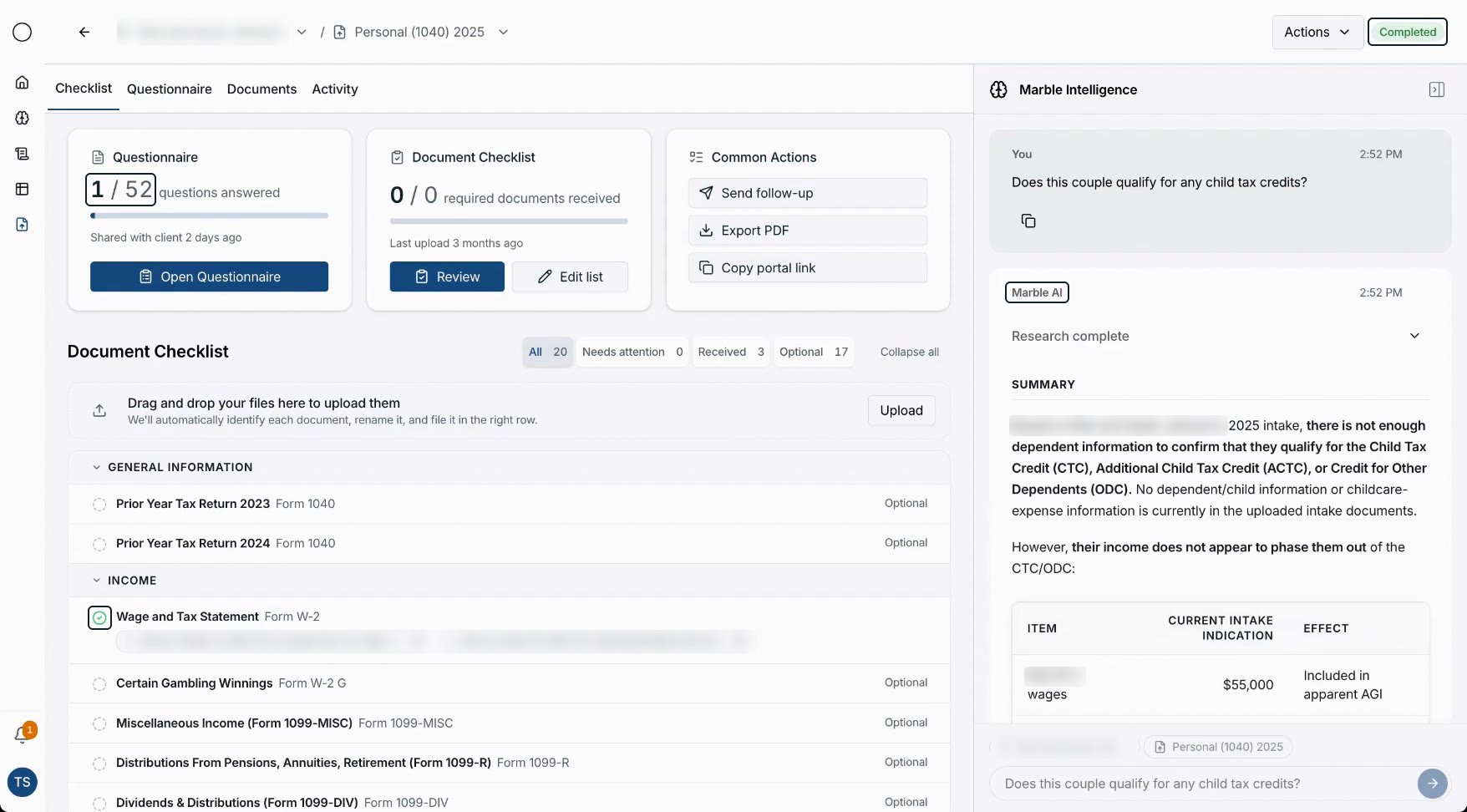
Status without an owner. “Completed” sits at the top while 1 of 52 questions is answered. It doesn’t say what was completed, or by whom.
A check that means “arrived”. The one green check in view sits on the W-2, where two files arrived. In a review tool, a check reads as verified.
The AI wears your label. Marble’s answer gets the same small label and timestamp as your question, then runs as a long block under “Research complete”.
None of this is careless. It’s what tends to happen when AI arrives before a visual grammar for it does.
One thing Marble already gets right: its assistant sits beside the checklist, not over it.
The system started before the domain did
This began late one Thursday as a design system for an AI product with no name yet. I didn’t know the domain, so I started from craft rather than content.
The foundations were measured, not guessed. Reference footage of a mature AI product gave 32px buttons and 14/20 body text.
Frame by frame, nothing in that footage overshoots. The first draft’s bouncy spring came out, and the system has had no spring since.
Two hours in, I brought in the real product, Marble, and a general system got one specific job.
My first plan kept Marble’s current look. Within minutes I reversed it: no color would come from Marble’s screens.
A concept on a real product shouldn’t borrow its identity, and a restyle would have hidden the real question. Marble’s screens would inform the information architecture only.
The cost. Instant familiarity. A Marble user would recognize the structure, not the paint.
Foundations built to scale
Marble keeps adding areas, and the system must fit side panels, an add-in and phones. Every new feature is a chance to invent its own color or button.
So I built one ladder, from the smallest decision to a whole screen: foundations, components, AI patterns, review and templates, every tier drawing on the same 124 role tokens per mode.
Two guardrails are code: a screen can only use the system’s values, and the build fails if the system setting and the in-app toggle would show different dark modes. A missing role is added to both modes, never borrowed.
The composer reads its container, so one component serves Home, a thread, a side panel and the add-in.
Scale also means more builders. Written rules, with the reasons behind them, let a designer, an engineer or a coding agent build the next screen without asking.
The cost. Anything new is slower, and screens get less freedom: one primary, seven radii, twelve type sizes.
Even my own framing called unchecked work “ready”
My starting principles said “Never make AI state ambiguous”. Yet my own example counted documents as “39 appear ready”.
Building the first review exposed the contradiction. “Ready” reads as done, and Marble can vouch for the checks it ran, never for review.
A state that only means “read” leaves two bad options: reopen everything to be sure, or trust work nobody checked. Either the speed Marble adds is lost, or its risk is hidden.
And it gets worse as Marble does more. The more it decides quietly, the more a person signs for work they never saw.
So this wasn’t a restyle. More than new buttons or colors, the system needed a grammar for who did what.
“Ready” became “No issues found”, and I made it a rule: “No issues found by Marble” must never visually imply “Verified by a professional.”
Six decisions followed. Each traded one good goal against another, and each comes with something you can try.
A check always means a person
Speed says show Marble’s clean results as done, so the professional can move on. Accountability says only a person can verify, because only a person signs.
I weighed three ways to draw the difference.
One status column. The simplest, even with clearer words. But one column can’t say who checked.
Confidence scores. “92% confident” looks precise, but a percentage can’t be audited. A line on a document can, so every claim points at its source instead.
Two owners, five states. Marble owns processed, no issues found and needs review; a person owns reviewed and resolved, and neither borrows the other’s look. This one won.
Marble draws in outline: dashed when it has only read a document, a magnifier when its checks found nothing. People sign in ink, with initials and the tick types firms already use on workpapers.
There’s no tick for trusting Marble. Its best state is a magnifier: it looked, and nobody has signed yet.
Violet means Marble wrote it, and one amber marks everything a person must decide. Mixed reds and oranges would imply a ranking that doesn’t exist.
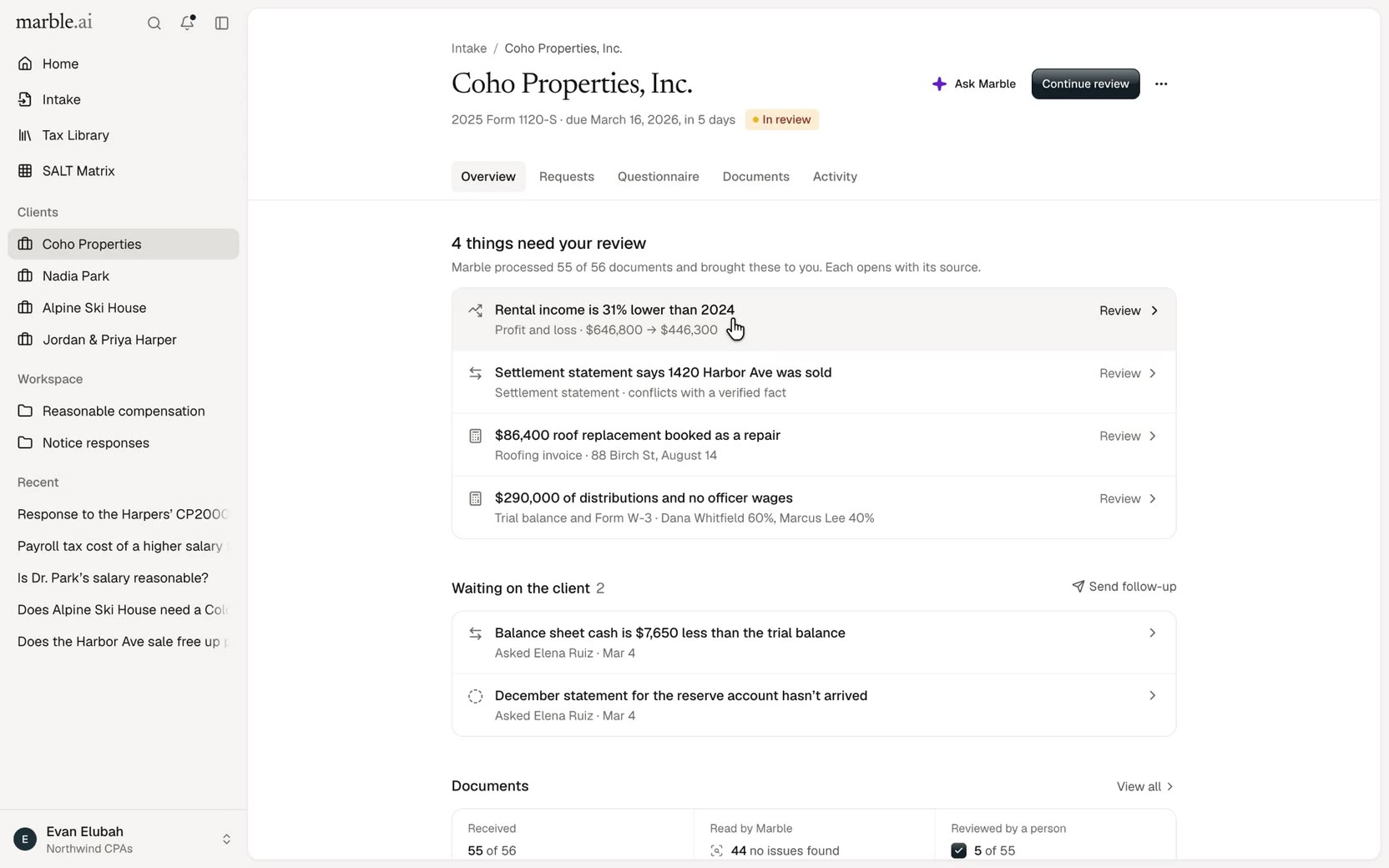
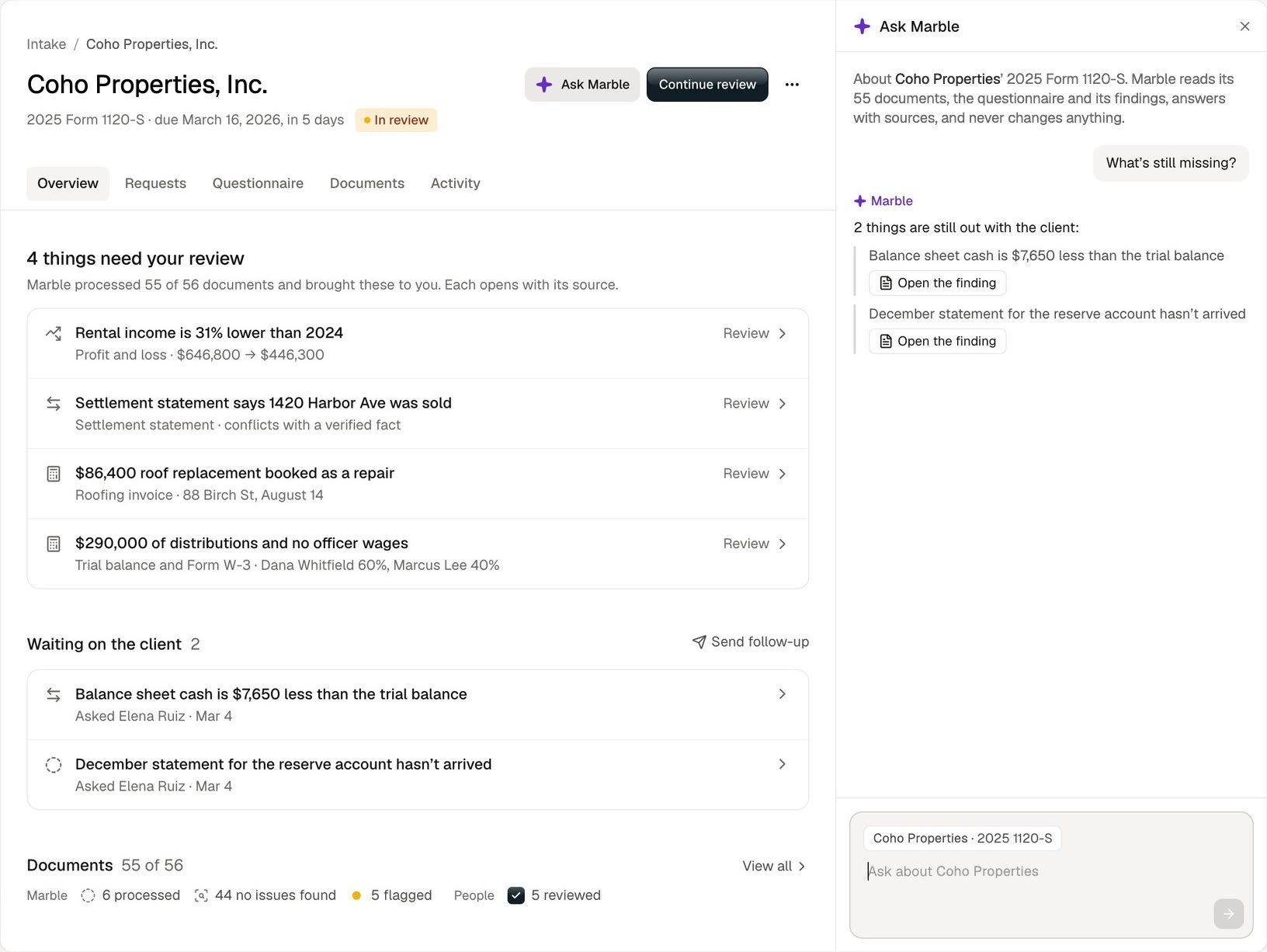
On Home, the explanation cards gave way to what needs you: “Needs your attention”, then “Waiting on clients”, then one line for everything on track.
The cost. Five marks take longer to learn than one green check, and Marble’s cleanest result looks deliberately unfinished.
It’s worth it. In the sample intake, Marble found no issues in 44 of 55 documents, and a person had reviewed 5 of those. Drawn as green checks, the other 39 would claim a review nobody did.
The constraints. My one unbendable line for the redesign was “Simplify the experience, not the capability.” Document-level review stays, and the grammar makes it legible instead of removing it.
Color never works alone, either. Amber has a dot and a label, and every tick has a glyph and initials.
The client’s paper stays paper, even in dark mode
A theme should feel like one surface. But a preparer checks numbers against the document the client sent, so the evidence can’t change with the UI.
I compared a flat white shell with a white sheet on a warm desk. I kept the desk and removed the flat variant: the page reads as the work, everything around it as the desk.
In dark, 112 of the 124 role tokens change and 12 hold, among them amber, violet and the document’s ink.
Brand ink #111E25 replaced pure black, with a gloss finish from my own Figma spec. Only solid actions wear it, and each view gets one primary.
Dark mode raised the harder question: should the client’s paper go dark too?
Invert it. Consistent, but an inverted P&L stops looking like the document the client sent.
Leave it pure white. Faithful, but it becomes the harshest thing on a dark screen.
Dim the paper, keep the ink. What I chose. Evidence keeps its ink: in dark mode the paper dims one step, from #FFFFFF to #ECEBE9, and its ink stays #181614.
The cost. The client’s paper is still the brightest thing in a dark UI. I accepted that, because evidence should look like evidence.
The constraints. Contrast is measured, not eyeballed. Body text clears APCA Lc 75 in both modes, and the paper’s ink reads at Lc 105 in light and 93 in dark.
The lightest gray allowed for reading clears Lc 75 only on white, so it’s kept for labels and metadata.
I loved the rounder Home, then took its corners back
Big, soft corners make an AI product feel friendly. In a dense tool, every surface sits inside another, so one exception spreads.
I explored a softer Home beside the current one, keeping every piece of information and every tool. The first pass drew a 20px question box in a 26px tray, with pill-shaped tools and a round voice button.
I loved the layout. The corners were the problem: off the system’s scale, the box and its tray stopped reading as one family.
Three options: keep the current Home, adopt the exploration as drawn, or keep its layout and put every corner back on the scale. I took the third.
The question box went back to 12px inside a 16px tray, with 4px between them: inner radius equals outer minus padding. Tools went to 8px.
The exploration’s starters had no chevrons either. It looked cleaner, but nobody would know they open, and Marble’s own Home shows them, so I put them back.
The cost. Home is a little less soft than the version I loved. Loving a version isn’t approving it.
The constraint. Seven radii, from 4 to 20px, keep the system crisp: controls take 6–8px, floating surfaces 10–12px, sheets 16px. The exploration became the only Home, on the scale.
Lag lives in the first frames
I set one bar for motion: smooth and world class. Smooth often gets read as slow and springy, but at the March peak a preparer opens the same things many times a day.
So the audit came before any redesign. At a fifth of its duration, the old default curve, the browser’s ease-out, had covered 31% of the distance; the old standard curve, 13%.
Two curves with the same duration can feel completely different. The lag people feel lives in the first frames.
Springs. The obvious reading of “world class”, and gone since that first draft. Lively motion reads as “a lot” in a professional tool.
The measured curves I had. Calm and faithful to the reference, but slow to start, so things trailed the click.
Fast-out curves that never overshoot. What I chose. The new default covers 68% of the distance at a fifth of the time, then settles without a bounce.
Each curve has one job. Exits leave on the fast curve in about half the entrance time, and drawers and push panels keep one pace both ways.
The cost. Less visible personality, and two calls I’m still weighing. Search opens with no motion, because the keyboard opens it many times a day.
And streamed words now fade in one by one, reversing the system’s earlier rule against it. They fade; they never move.
The constraints. Under reduced motion, everything lands in its end state. And smooth can’t be judged at full speed, so every change was checked frame by frame in slow motion, down to 0.02×, in light, dark, phone width and reduced motion.
Every demo on this page has a speed switch. Set it to 0.1× here, then try the others.
Help docks beside the work instead of covering it
A modal gives the assistant full attention. But every question is about the page behind it: the findings, the documents, the dates.
My first intake-wide Ask Marble opened as a modal over a dimmed page. Two hours later, I pulled it.
Marble’s own intake already keeps its assistant beside the checklist. My first version had lost the one thing it got right.
Modal. Focused, but the work goes dark and out of reach while you ask about it.
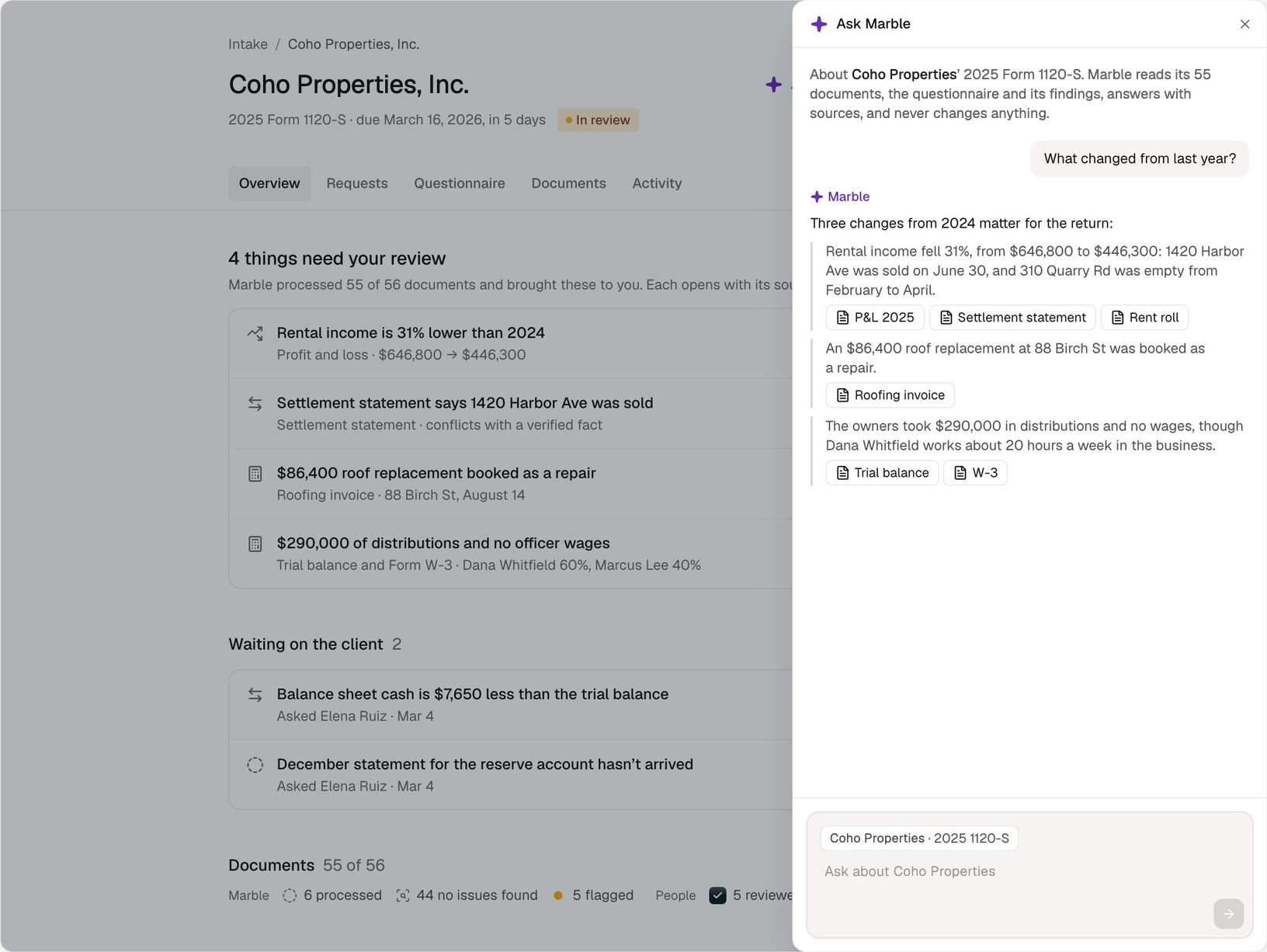
Docked panel. What I chose. It grows from the sheet’s right edge and pushes the page aside, at the same pace both ways.
The page stays usable beside it, and closing only hides it, so the conversation is still there when you come back. It became a rule: assistive panels dock, they don’t pop.
Menus follow the same idea at a smaller scale. They grow out of the button that opened them, nudged 4px back toward it, and leave faster than they came.
The cost. The page gives up 400px of width, and its rows rewrap. On a phone there’s no room beside the page, so the panel covers it.
The constraint. Ask Marble keeps the product’s structure: it lives inside an intake, answers only about that client’s documents, questionnaire and findings, and never changes anything.
AI is a layer of the system, not a feature
AI interfaces tend to be designed one feature at a time: a chat here, a spinner there, each with its own look.
So AI patterns are their own tier, between components and review: eight pages, from the composer to voice, sharing a few rules.
Violet means the AI and nothing else. Reasoning stays gray and is never raw; only the answer is set at full strength. Each source links to the exact passage. The agent shows where it’s working, only while it works, and waiting shows what’s actually known, no more.
The cost. A new AI feature gets less room for flair: it’s built from these patterns, and violet can’t decorate it.
Show the work while it happens, then step back
My own direction pulled two ways. One rule banned AI theatre: no glow, no confidence meters, no “thinking” UI.
Three hours later I wanted the opposite: a research chat that shows how it thinks, with sources you can open on the side.
Both were right. A professional needs to see how an answer was reached, but a wall of reasoning buries the answer itself.
Hide the reasoning. Clean, but a professional can’t see how the answer was reached.
Keep it on screen. Transparent, but it becomes the large block of text I’d banned.
Show it live, then fold it. What I chose. Each phase gets one job and one motion.
It searches, thinks in a small window whose lines glide up, then folds to one line: “Thought for 5s”. The answer’s words fade in without moving, and each claim is numbered.
A citation docks the sources beside the thread, with that source lit. There’s no confidence score, no glow and no sound.
Your question sits in a bubble on the right and Marble answers plainly on the left, so the answer needs no byline and violet stays out of the thread.
The cost. Once the reasoning folds, it’s one click away instead of on screen.
The constraint. Tax answers have to be right. No model runs behind this prototype: the answer is scripted, and every claim cites the statute, regulation, IRS guidance or client file it rests on.
Checked against IRS and regulation text, 16 of 20 tax claims held as written and none was flatly wrong. One correction changed an answer.
The same rules run a full intake review
A grammar only matters if it holds up across a whole workflow. In the Marble Intake case study, the same rules run a review that opens on the 4 things that need you, not 55 documents.
That review reused 21 components from the system and added 5 small primitives where it had nothing.
A working grammar, not yet a tested one
What it shows. One token set and one motion system run every screen, the AI patterns share one set of rules, and one grammar marks every review state, in light and dark, at phone width and under reduced motion.
5 tiers, from foundations to templates · 124 role tokens per mode · 7 radii · 7 easing curves · 59 component files · 34 docs pages, 8 of them AI patterns · 14 live product views in the docs
How I validated it. I prototyped in code so every interaction is real, and built the sample data to foot: the P&L’s four rents add to $446,300.
What it doesn’t show. It’s a concept with fictional data, and no preparer has used it. The serif in these recordings and demos stands in for the system’s display face.
What I’d test next. Whether preparers read outline versus ink correctly, without a legend, at the March peak, and whether someone new can build a screen from the rules alone.
The most useful move was restraint
The less Marble’s work looks like a decision, the more a person’s decision means.
The hardest calls went against my own ideas: my “ready”, my “keep Marble’s look”, my modal, my rounder Home. Each time, the system got simpler and more honest.
What I’d carry to any AI product: build foundations that keep the next screen, and the next person building it, on the system; draw who did the work instead of labeling it; keep evidence looking like evidence; and put help beside the work, never over it.