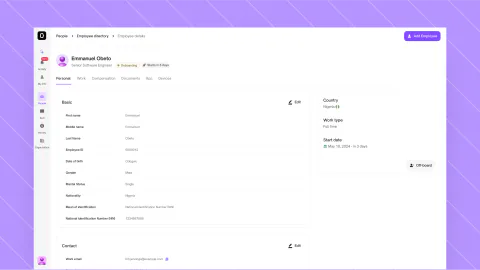
Turning 55 documents into 4 decisions
Redesigned Marble’s tax intake as an independent concept, so a client’s file opens on the few decisions only a professional can make, each beside its evidence, while keeping every capability.
- Role
- Product designInteraction designPrototyping in code
- Team
 EvanProduct designer
- Timeline
- Sep 24–30, 2026
A client sends 55 documents. Marble, an AI-native tax platform for CPAs, tax preparers and reviewers, already reads them, then identifies, splits, renames and files each one.
A professional has to check that work. In Marble’s public demo they still do it one document at a time, and the better Marble reads, the bigger that job gets.
I’m not affiliated with Marble, and every client, number and document here is fictional. The demos are live, so you can test each trade-off.
Review is still built around documents
The hard part, reading and filing, already works. Review is where it slows, and the public demo shows four reasons why.
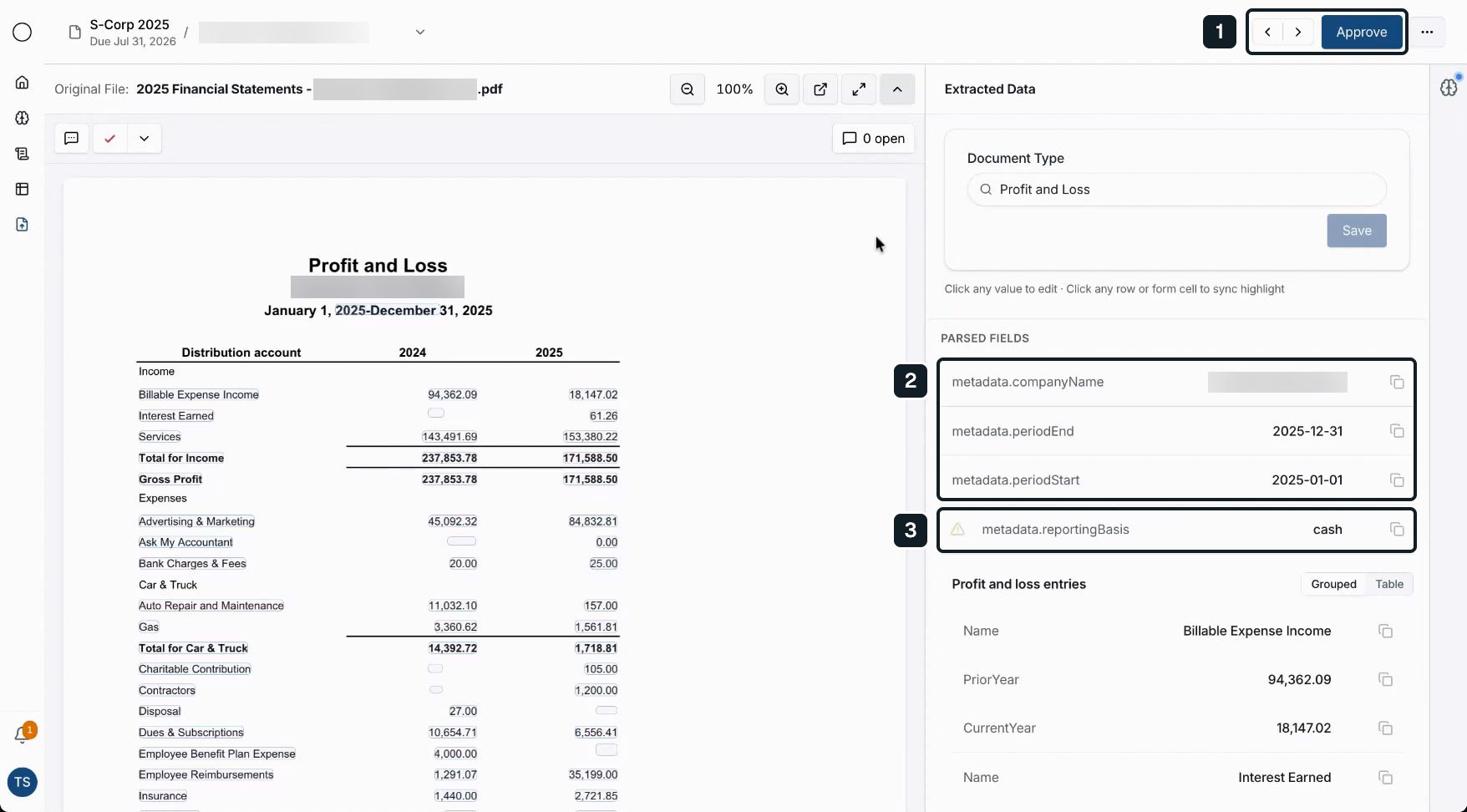
1 · Approve, then next. The document is the unit of work, so every file needs its own approval.
2 · Field names, not facts. Extracted data reads “metadata.periodEnd”, the schema’s words rather than a preparer’s.
3 · A flag without a reason. A warning icon marks one field, and the screen doesn’t say what’s wrong or where to look.
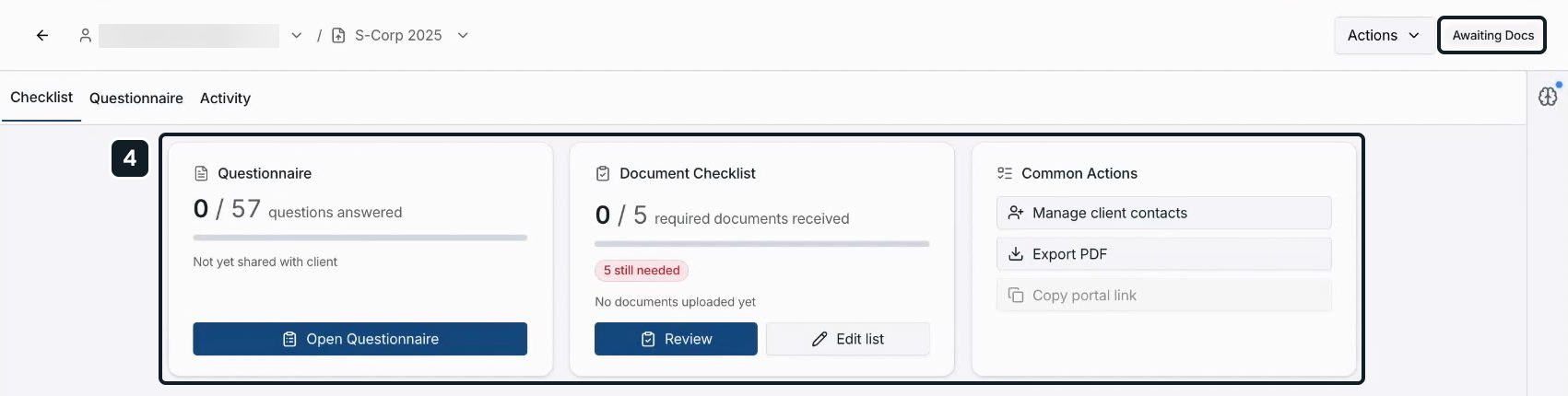
4 · Needs me, or the client? The header says “Awaiting Docs” while the questionnaire is “Not yet shared with client”, so the status points at the client when the next move is still the firm’s.
Each screen does its job. Together they leave the sorting to the professional.
My first answers reorganized the work instead of reducing it
The design system behind this came first, and has its own case study. Here, Marble’s screens were my map, never my style guide.
Then the review went through five versions in one day. The first three taught me what the problem wasn’t.
My first framing still counted documents: how many were processed, how many needed review.
By version two I had a test file: a fictional real estate S corporation with 55 documents.
Version two showed everything at once: Marble’s summary, count bars, the findings, a finding’s detail and the document. My verdict: it “feels a bit too much”.
Version three calmed that into one centered column, led by a summary card I’d given a violet border to mark Marble’s voice.
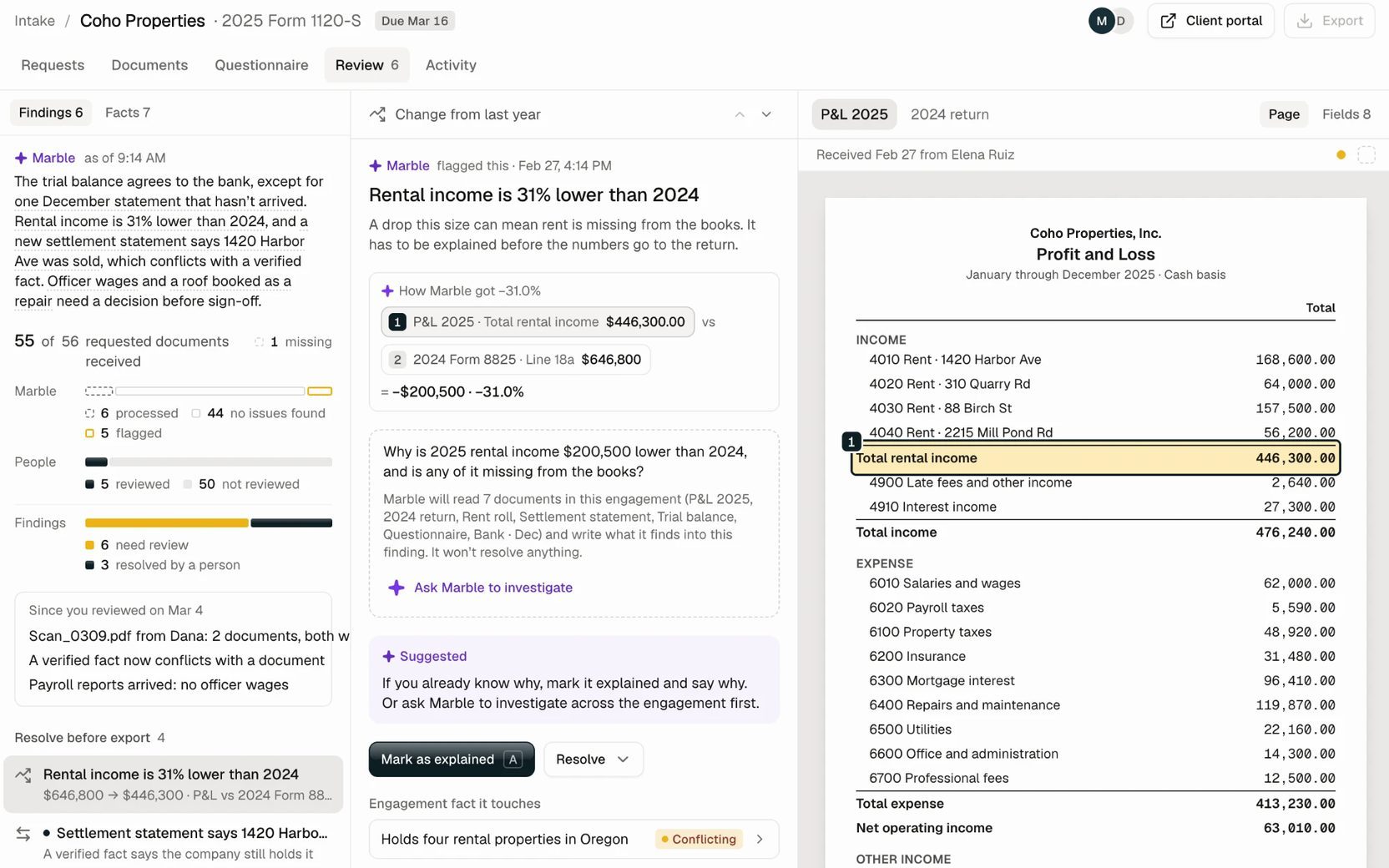
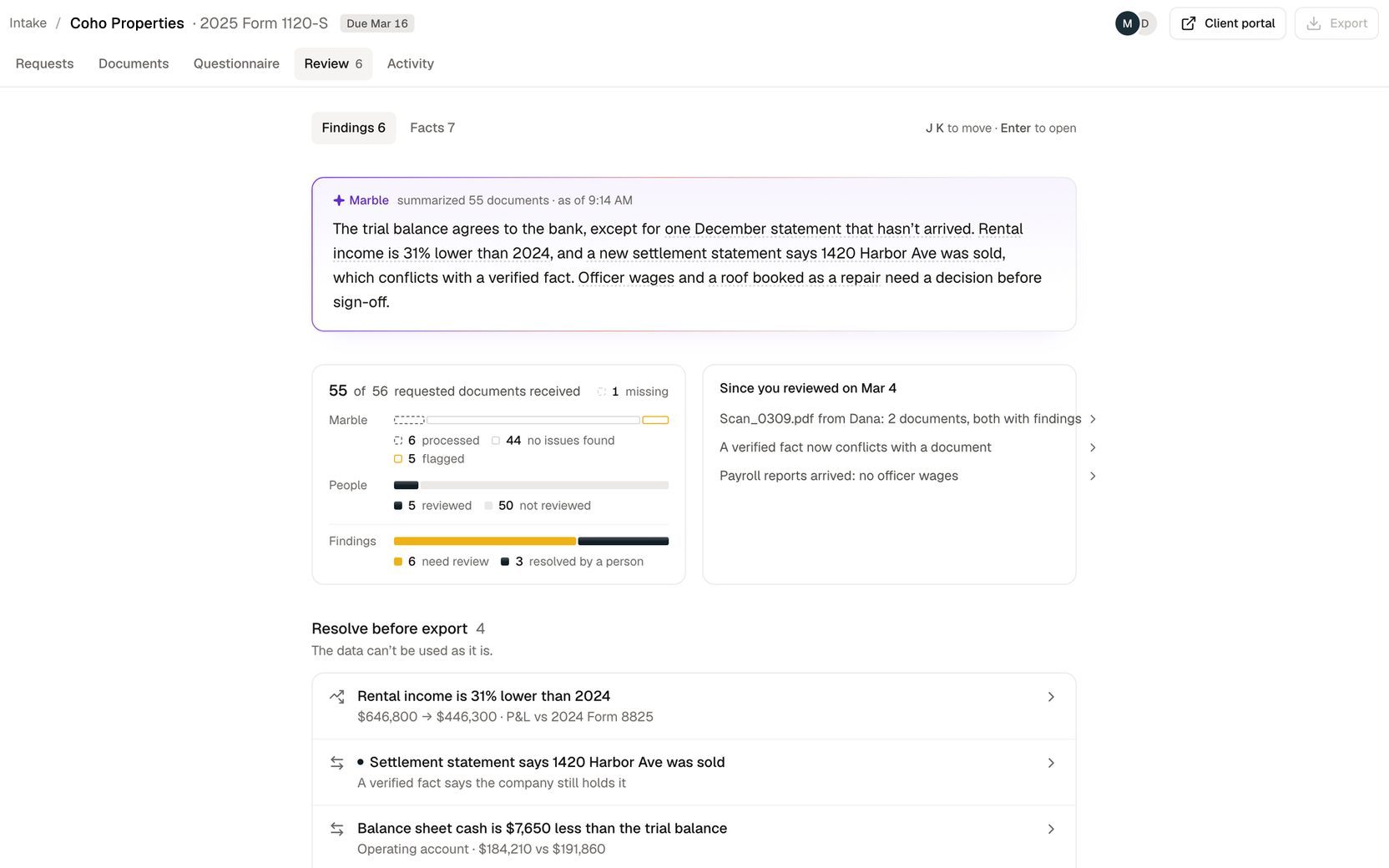
Every panel was accurate, and none of it was needed to decide anything. I had made Marble’s output easier to read, not the professional’s work smaller.
The real problems sit between documents
So I asked myself what Marble’s one-document loop would do with my test file. The four issues that need a decision don’t show inside any single document.
Rent is 31% lower only next to last year’s return, and the reason sits in a settlement statement and a rent roll. A roof is a problem only once the trial balance books it as a repair.
Each of the four needs two or more documents side by side. Reviewed one at a time, every comparison stays in the preparer’s head.
So I rewrote the goal: not “documents ready for review”, but “4 things need your review”.
And I set one test for every screen after it: the “wow” should come from how little work the professional has to do.
Every shortcut had to survive a professional’s signature
Before drawing anything, I wrote down what the design had to live inside.
A person signs. Due diligence stays with the professional, who may have to defend the work months or years later. Software can’t take that on.
Every capability stays. My rule for the whole redesign: simplify the experience, not the capability. Nothing Marble’s intake does today goes away.
Deadlines don’t wait. A calendar-year S corporation’s 2025 return is due March 16, 2026, and my sample file sits five days out. Waiting on a client can’t be allowed to block the preparer.
Experts, not novices. Preparers bring deep tax judgment, so density is fine where it helps, and no tax concept gets simplified away.
Evidence stays paper. Client documents look like documents in light and dark, and Marble only draws over them.
Client data stays private. Tax files hold sensitive financial data. The prototype reads uploads in the browser, nothing leaves it, and nothing reaches a client until a person sends it.
No AI theatre. No glowing surfaces, confidence meters or “thinking” UI.
Together they come down to one rule: Marble processes, checks and investigates; only a professional reviews, resolves or verifies.
Six decisions came out of that rule, and each one had a price.
Review the exceptions, not the documents
The tension. A preparer stands behind the whole file, so opening every document feels safe. At 55 documents, safe means slow, and one at a time never puts two side by side.
A faster approve loop. It saves clicks, not judgment. Time should be saved by findings, not by a stamp.
Accept all. My first version had one for clean documents. I cut it: one click would sign off on work nobody inspected.
Better document review. It stays, and each tick names what it was checked against. As the starting point, though, it still leaves the sorting to the person.
Exceptions first. What I chose. The intake opens on the 4 things only a person can decide, each one click from its source.
The cost. Most of the file now passes without a person opening it. So the screen never says “ready”: it counts “44 no issues found” under Marble and “5 of 55” under a person.
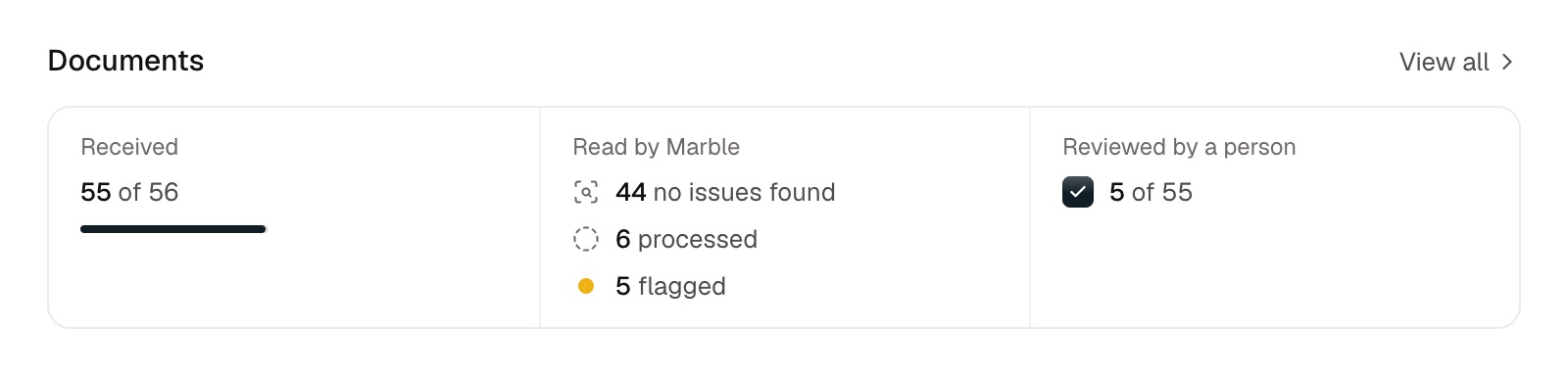
The risk moves too, to whatever Marble fails to flag.
The constraint. Circular 230 §10.34(d), which practitioners already work under, generally lets them rely in good faith on what a client provides, without verifying it.
What it requires is reasonable inquiry when that information appears incorrect, inconsistent or incomplete.
A missing statement is incomplete. A sale that contradicts a verified fact is inconsistent. A roof booked as a repair may be incorrect.
Each finding is that inquiry, brought to the person who has to make it. Exception-first review isn’t a shortcut around the standard; it puts the standard on screen.
Bring the evidence to the decision, not a verdict
The tension. A preparer won’t act on what they can’t trace, but every panel of context competes with the one decision on screen.
A summary in Marble’s voice. My violet card read well, but a summary is a verdict to trust. My own “no AI theatre” rule cut it a few hours after I added it.
A confidence score. A number with nothing behind it to check.
An investigation report. My seven-section investigation view was thorough, and long enough to bury the answer.
Evidence at the decision. What I chose. A finding opens beside its page, and each number carries a tag that marks its line on the document.
Ask Marble sits inside the finding as a few questions written for it. The answer is a small ledger: rows that add up, their sources, and what Marble didn’t check.
It becomes the decision only if the preparer uses it.
Beyond the finding, Ask Marble covers the whole intake. In Marble’s public demo, its assistant waits beside the intake with “Ask me anything”, so the preparer has to know what to ask.
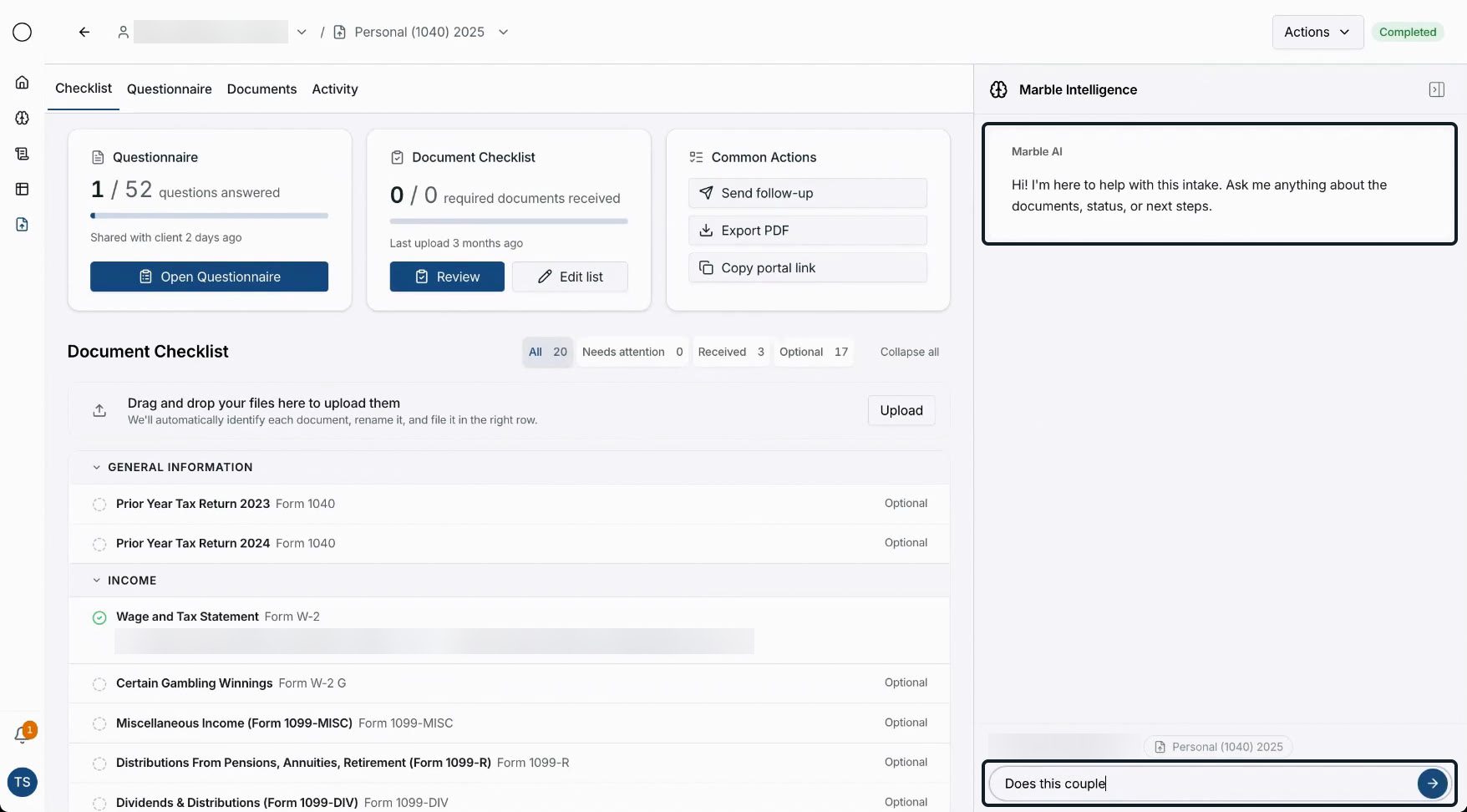
Mine opens on up to four questions it can answer for the intake as it stands. It cites every point and never changes anything.
The cost. Marble’s summary, the count bars and the facts view all went, and each kind of finding needs its questions designed in advance.
The constraint. The preparer signs for every number they use, so each one has to trace to a line on a page. A paragraph can only be trusted; a sum with sources can be checked.
Marble proposes; only a person commits
The tension. Marble could finish the job itself: update facts, message the client, close findings. But the preparer is the one who has to defend the file.
The hard case: a settlement statement says 1420 Harbor Ave was sold, while the engagement holds “four rental properties” as a verified fact.
Five things already use that fact, from the Form 8825 draft to a cash-flow letter.
Update it everywhere. Fastest, but facts feed every later answer and draft, so a silent update shifts the ground under all of them.
Leave it alone. Then nothing that used the fact knows it changed.
Update it and flag its uses. What I chose. The review pauses on what changed and marks all five uses “Needs another look”. Marble changes none of them.
The client gets the same rule. Marble drafts the officer-wages question, and it waits in one follow-up per person until someone presses Send.
Each action is named for its outcome, like Capitalize or Keep as a repair. A decision lands as an ink mark, then the next finding opens; judgment calls ask for one sentence.
I chose Undo over a confirm step, and it stays for six seconds. J and K move between findings, and Esc hands focus back to the row you left.
The cost. The run stops where it could flow, five uses of the fact wait for another look, and reaching the client takes one more click.
The constraint. Due diligence belongs to the professional, and a simpler screen can’t mean a thinner record. Every decision keeps who made it, which documents were open and, for judgment calls, why.
One next step, and every capability kept
The tension. Marble’s intake does a lot, and every capability is a reason to add a button.
My first versions only reviewed. A real intake also builds a checklist, shares a portal, chases the client and keeps a record.
Cut features. Ruled out from the start: removing something useful only makes the concept look simpler.
A dashboard of cards. It only moves the sorting onto the page.
A Review tab. It would only repeat the Overview’s list.
One next step. What I chose. I kept Marble’s tabs, renamed Checklist to Requests, and added an Overview that answers what needs you.
The header offers one primary that changes with the state: Share with client, Continue review, Send follow-up or Complete intake. When nothing needs you, there’s no button.
And waiting never blocks the preparer. Anything owed, they can fill in, upload or mark not needed themselves.
Everything else stays a click away: Requests, Questionnaire, Documents, Activity, comments and the ⋯ menu.
The cost. Less is visible at once, and an intake that’s simply waiting shows no button, which can read as something missing.
The constraint. This had to be a better version of Marble’s intake, not a replacement.
Read the upload, and hand doubt to a person
The tension. Filing everything automatically saves the most clicks. Filing one thing wrong, silently, costs the most later.
Marble’s demo already files each upload in its row. My questions were what it should do when it isn’t sure, and how a preparer sees where seven files went.
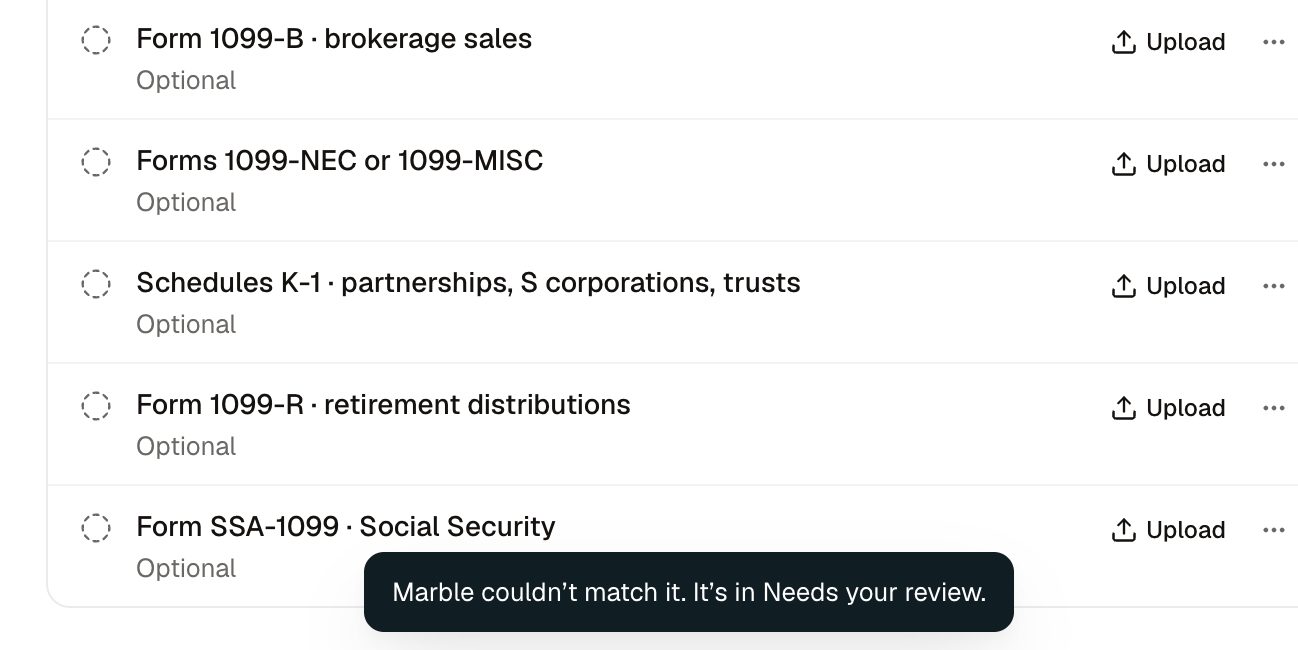
Match by file name. My first version did, so every “Screenshot 2026-09-25 at …” I dropped on it went to review. Phone photos and scans arrive named like IMG_4471.jpg or Scan_0298.pdf.
File on a best guess. A 2024 W-2 filed as this year’s would flow quietly toward the return.
Read the content, admit doubt. What I chose. Marble reads each file, phone photos included, and files it under the request it answers.
When a file doesn’t clearly belong anywhere, it comes to a person with Marble’s reason: the wrong year, an unclear type, or two requests that both fit.
Each filed page flies to its row on a gentle arc, and the row glows once, so you see where it went. With reduced motion, it simply lands.
The cost. Reading takes visible time, and two of the seven files still need a person.
The constraint. The tax year and the payer decide where a document belongs, and a 2024 W-2 looks right until you read the year.
One fact per column beats a clever sentence
The tension. A sentence per row reads like a story; a column per fact can be sorted. Preparers ask the list questions, like who was asked longest ago.
Stacked cells. My earliest list had status tabs and two lines in each cell, and cut off three clients’ status lines.
Group by whose turn. Round one below summed each return up in a sentence, like “4 requests, 3 questions out · asked Feb 2”. My verdict: “more interesting, but not simple enough”.
One fact per column. What I chose for round two. Status, Due, Documents, Findings, Questions and Last asked each get a column, every heading sorts, and a status filter sits in the toolbar.
The cost. The table outgrows the window, so it scrolls sideways with the client’s name pinned.
The constraint. Experts compare. A sentence has to be read row by row; a column answers in one click.
I judged every call in a working prototype
Review is timing and state: what lands, what waits, what can be undone. Mockups can’t show that, so I designed in a working prototype and judged each trade-off by using it.
I checked each flow in light and dark, at phone width, by keyboard and with reduced motion.
Every demo here has a speed switch, down to 0.1×, so you can judge the motion yourself.
The fictional numbers foot. The trial balance balances, and the rent drop reconciles to the dollar: Harbor Ave’s lost half-year (−$168,600), Quarry Rd’s empty months and lower new rent (−$32,000) and the other two properties (+$100) make −$200,500.
Both tax treatments cite real authority: Treas. Reg. §1.263(a)-3 for the roof and Rev. Rul. 74-44 for officer wages.
What it proves, and what it doesn’t
55 documents in · 4 decisions for a person · 2 waiting on the client · 0 “accept all” buttons
It’s a working prototype with fictional data. No preparer has used it, so these are design outcomes, not results.
I’d test the miss rate first. What Marble fails to flag matters more than what it flags.
Then the later passes. Documents arrive over weeks, so the review has to hold up on the fifth pass, not just the first.
And one question only firms can answer: must someone sample the documents where Marble found no issues before sign-off?
I’d start by shadowing preparers in March, then run the prototype on redacted files and compare its decisions with the firm’s.
Most of my decisions were subtractions
Count bars, a summary card, a bulk accept, a clever list: each one went. The hard part was proving that what I took out wasn’t needed to decide.
What I’d take to any AI workflow: move the work to the exception, bring evidence instead of confidence, let the AI propose and people commit, and simplify the experience, never the capability.