Rank Home Dashboard Redesign
Redesigned Rank’s home experience into a clearer wealth dashboard, helping users understand what they own, what they owe, and what action to take next.
- Role
- Product designUX strategyInteractionVisualUX writingDesign QA
- Team
 EvanProduct Designer
 LekeProduct Manager
 SamuelMobile Developer
- Timeline
- 2 weeks · 2026
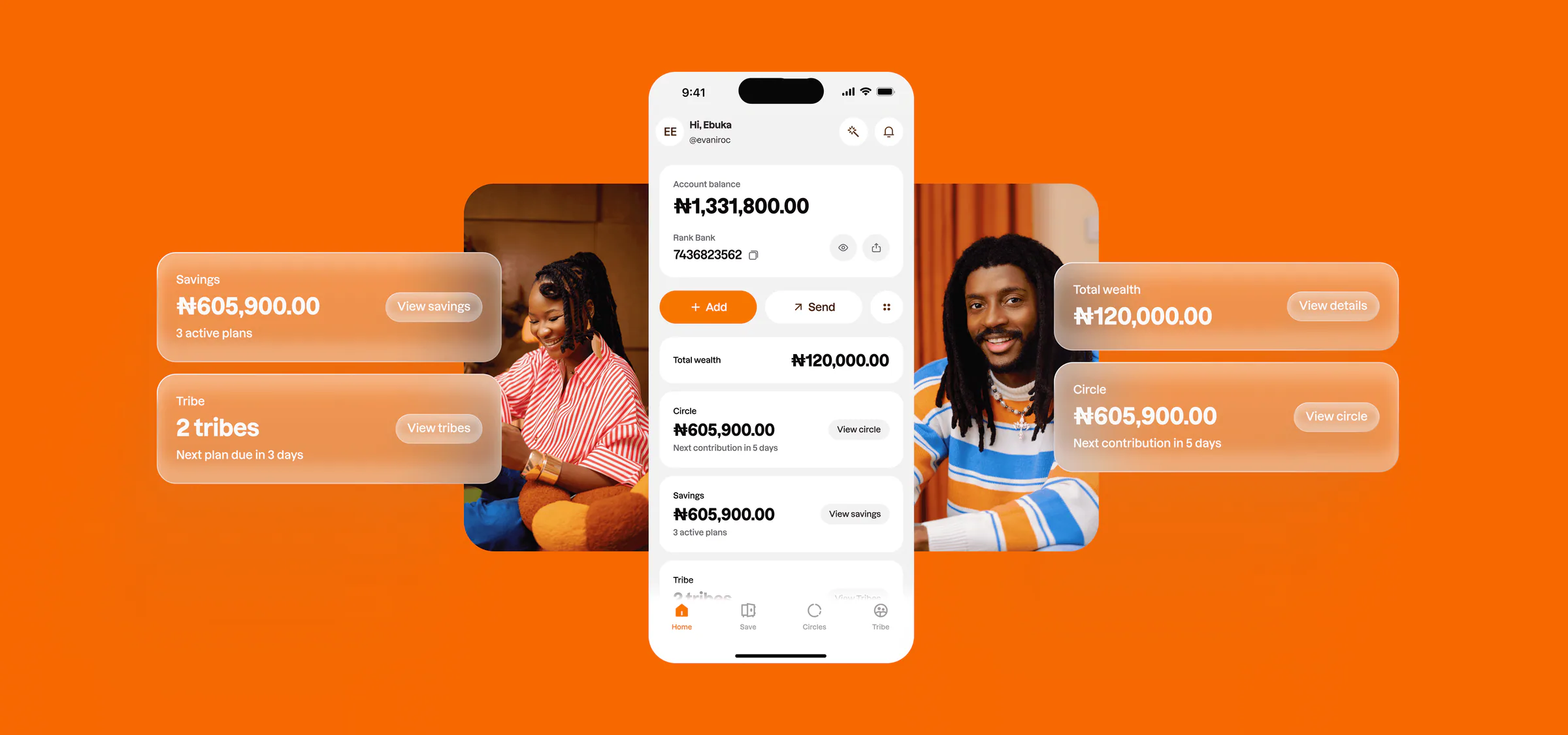
Rank is built for how people actually build wealth in groups. This redesign turns the Home screen into a calm dashboard that helps users see their money, understand what’s next, and take the next best action without thinking too hard.
Overview
When I joined Rank, the product was going through a rebrand. The team had just finished V1 of the new app, and the vision was getting clearer: Rank wasn’t trying to be another wallet or savings app — it was becoming a money system for people who save, contribute, join groups, and build wealth together.
But one screen hadn’t caught up: the Home screen. It had the usual fintech pieces — a balance card, quick actions, promos, transactions, content. It worked as a wallet home, but it didn’t feel like the front door to a wealth product. The goal became clear: redesign Home so users can understand their money, know what needs attention, and take the right action faster.
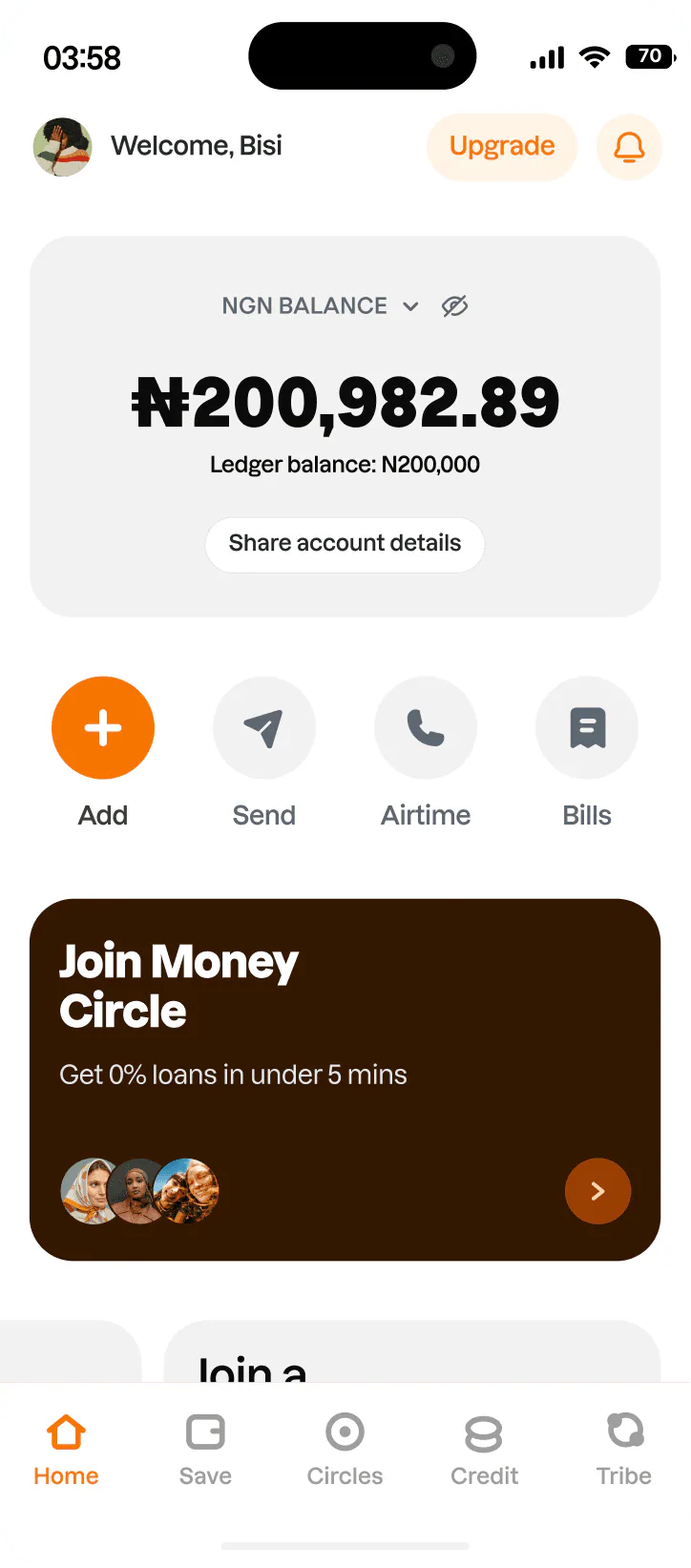
The product changed. Home hadn’t caught up.
Rank was no longer just about holding money or making transfers. Users could save through different plan types, join public Circles, take part in private Tribe activity, prepare for top-ups, wait for payouts, and manage group commitments.
A normal fintech home gets away with a balance, shortcuts, and recent transactions. Rank needed more — Home had to answer, at a glance: What do I have? Where is my money? What am I part of? What’s coming up? What should I do next? The old Home had the pieces, but it wasn’t organized around those questions.
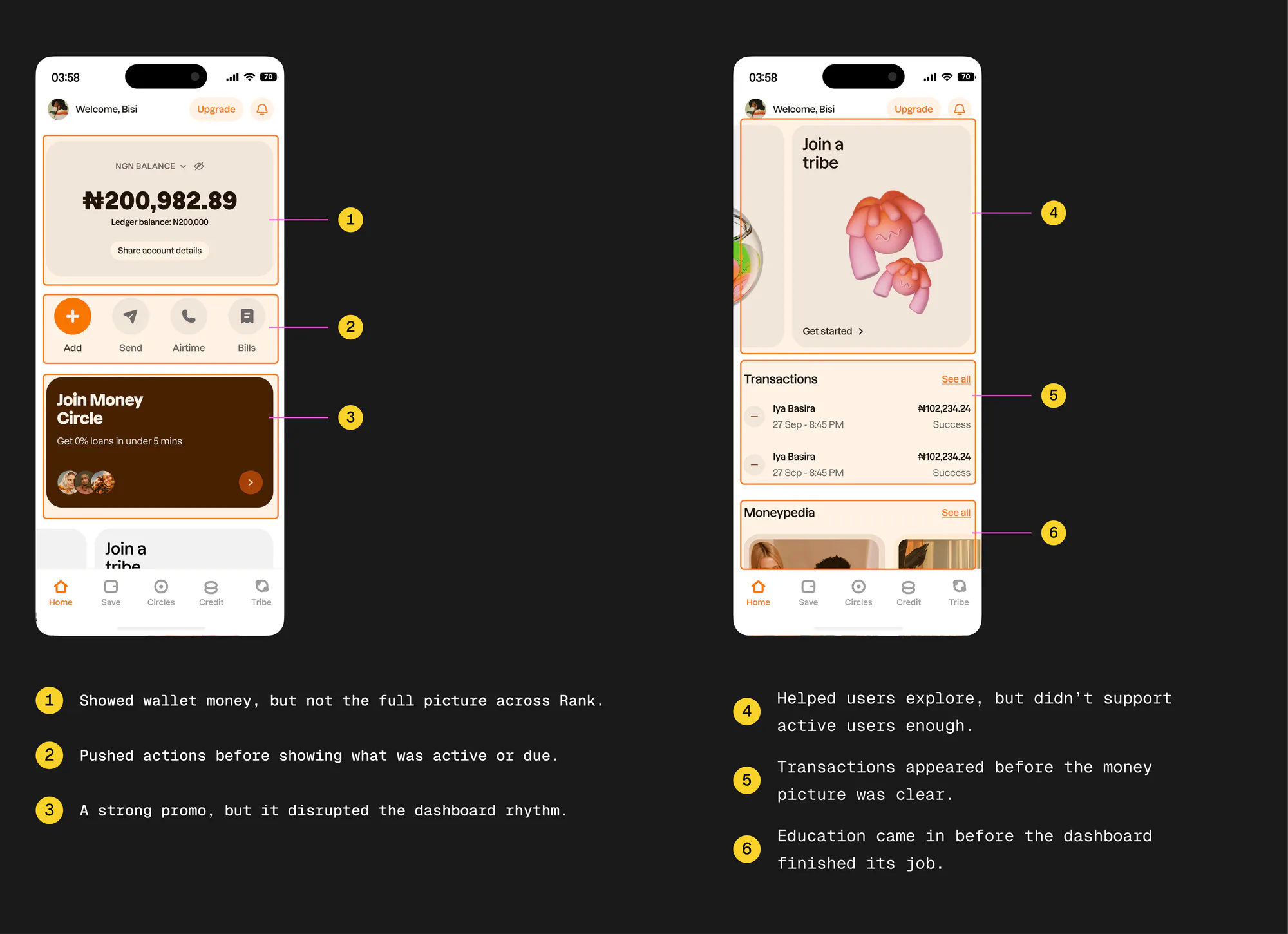
The redesign wasn’t about adding more
The easiest fix would have been more sections — a Goals section, a Circle section, a Tribe section, more cards, more shortcuts. That would have made it worse.
The real work was deciding what each part of Home was responsible for. I treated Home as a system with four jobs: show the money (what you have), show the products (what’s active across Cash, Savings, Circle, and Tribe), show what’s next (top-ups, contributions, payments), and show the next action (what to do now).
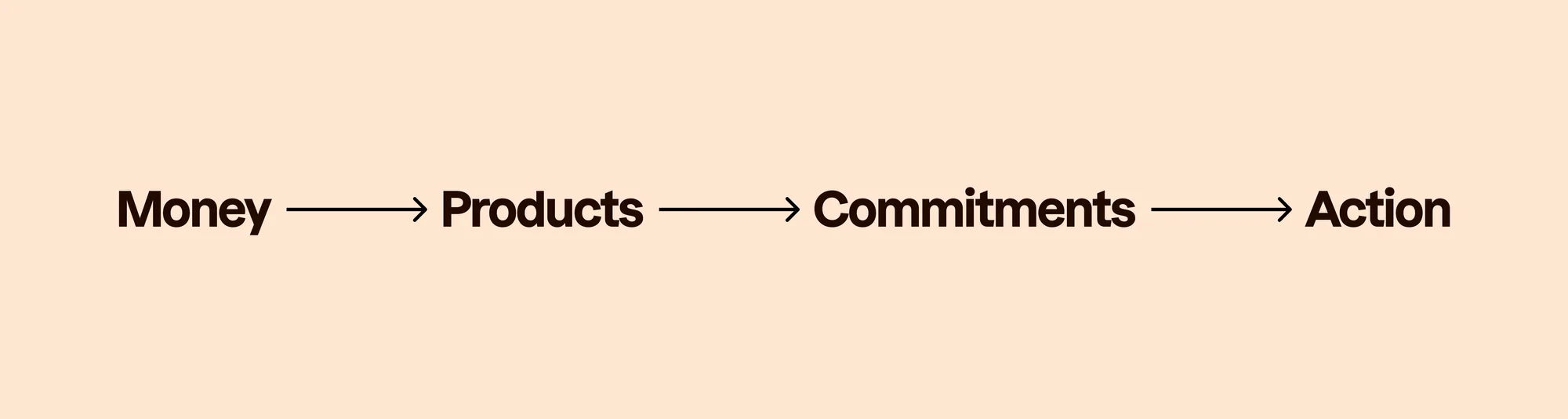
The biggest risk wasn’t visual clutter — it was product misrepresentation. Cash, Savings, Circle, and Tribe behave differently. If Home treated them all like balances, it would look clean but still confuse people.
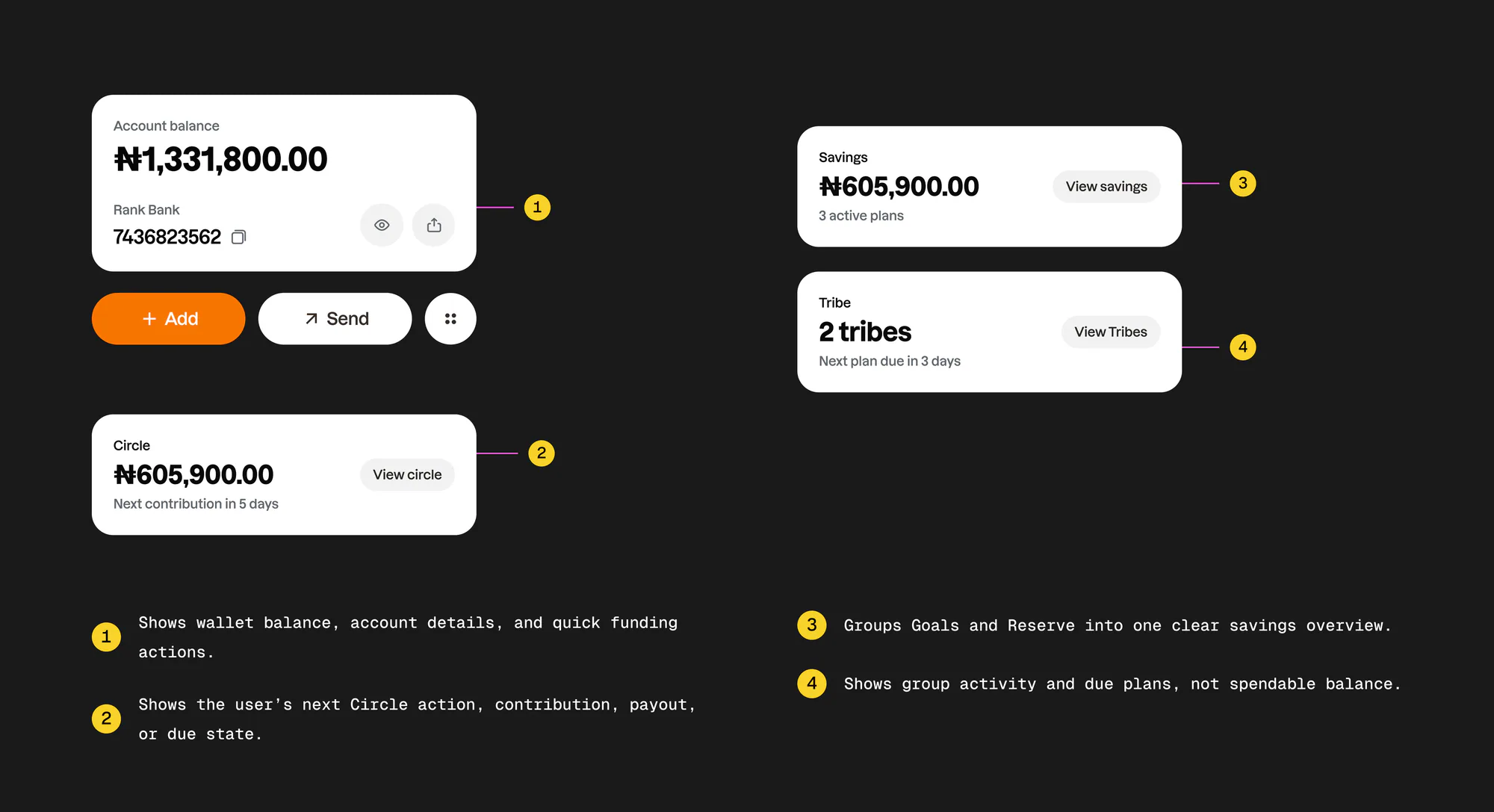
Savings wasn’t just Goals — Goals and Reserve became one summary card, with top-ups moved into Upcoming payments. Circle wasn’t one static balance — it needed lifecycle states. Tribe wasn’t a balance — it became activity-based. Upcoming payments became the planner for every future commitment. And hide balance had to protect every value on Home, not just the top number.
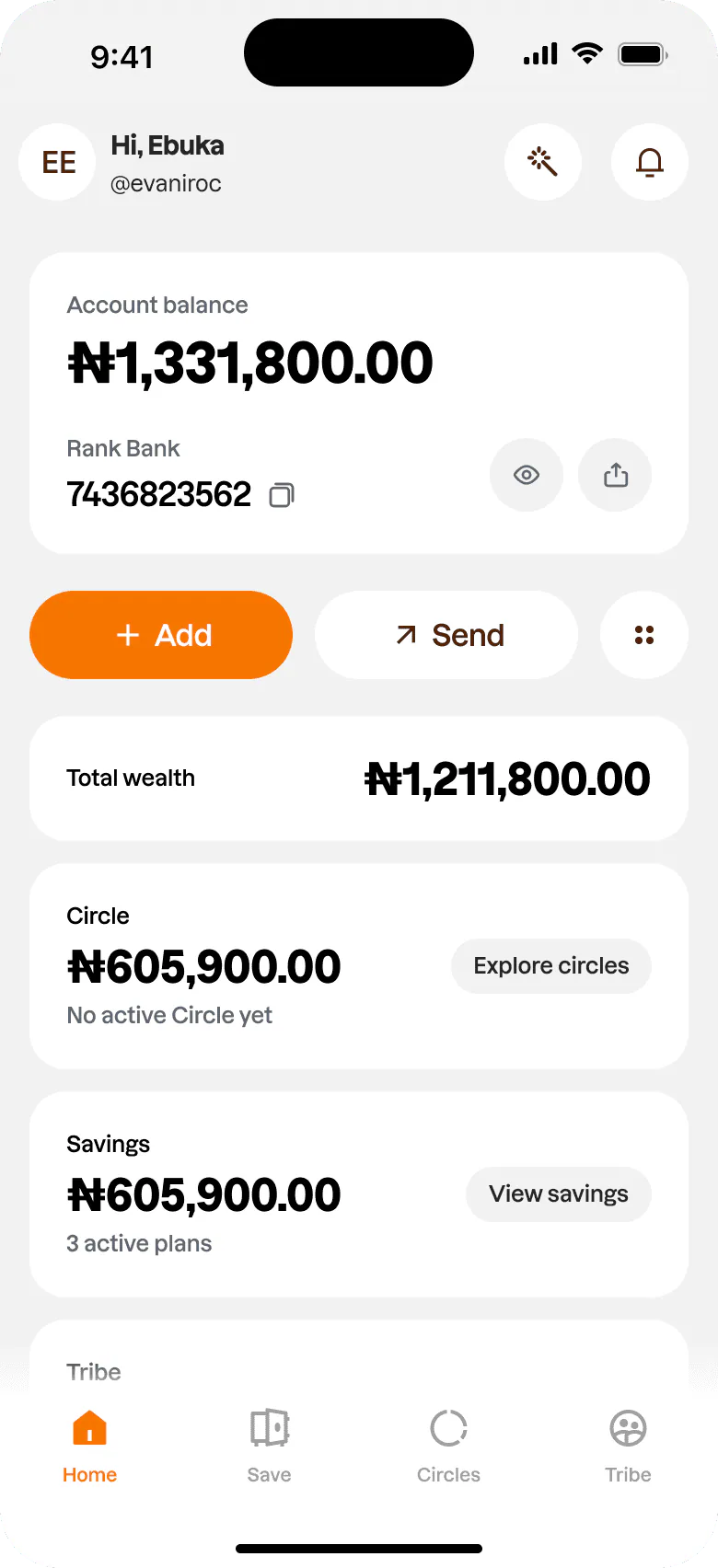
Once the product rules were clear, the layout followed. The old Home went balance → quick actions → promo → product discovery → transactions → content.
The new Home became account → core actions → Setup Guide → Total Wealth → product cards → upcoming payments → transactions → money content. First you understand your account, then the next important action, then active products, then what’s coming up, then recent activity. It moved Home from “things to click” to “things to understand and act on.”
The solution
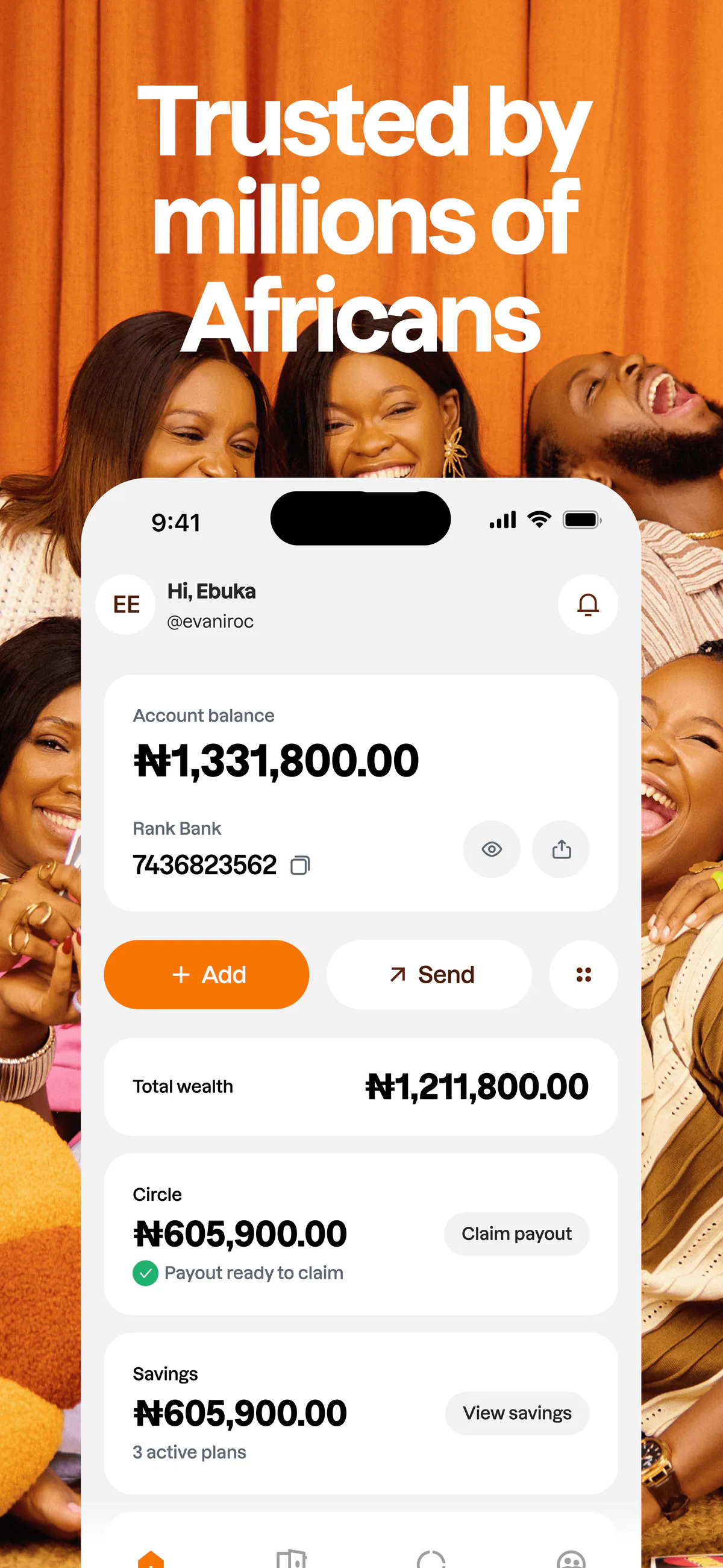
The final Home gives users a clearer view of their money, then guides them to the next meaningful action. Each part of the screen has a job: the top anchors you in your account, the middle shows wealth and product activity, the lower sections help you plan, review, and learn.
The account card had to feel like a stable anchor — account balance, bank name and number, copy, hide and show balance, and share details. The goal wasn’t a decorative top; it was a dependable one.
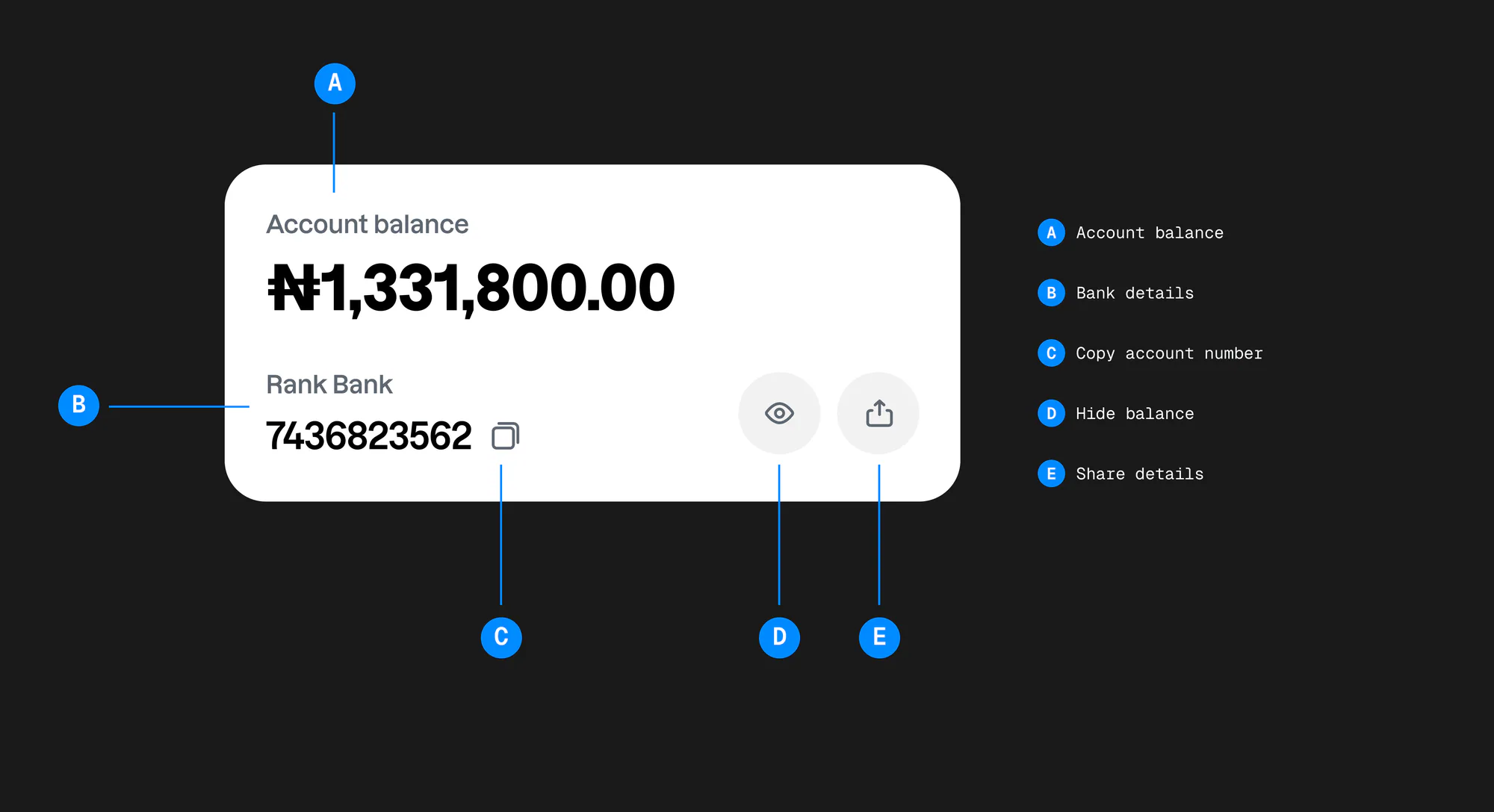
One feedback question reshaped the interaction: if the user hides the balance on the main card, what happens to every balance below it? If only the top number hides, the rest of Home still leaks financial information.
So hide balance became global. Account balance, Total Wealth, Savings, Circle amounts, upcoming-payment amounts, and transaction amounts all mask together — while context stays visible: 2 tribes, next plan due in 3 days, no active Circle yet. The page still works; the money stays private.
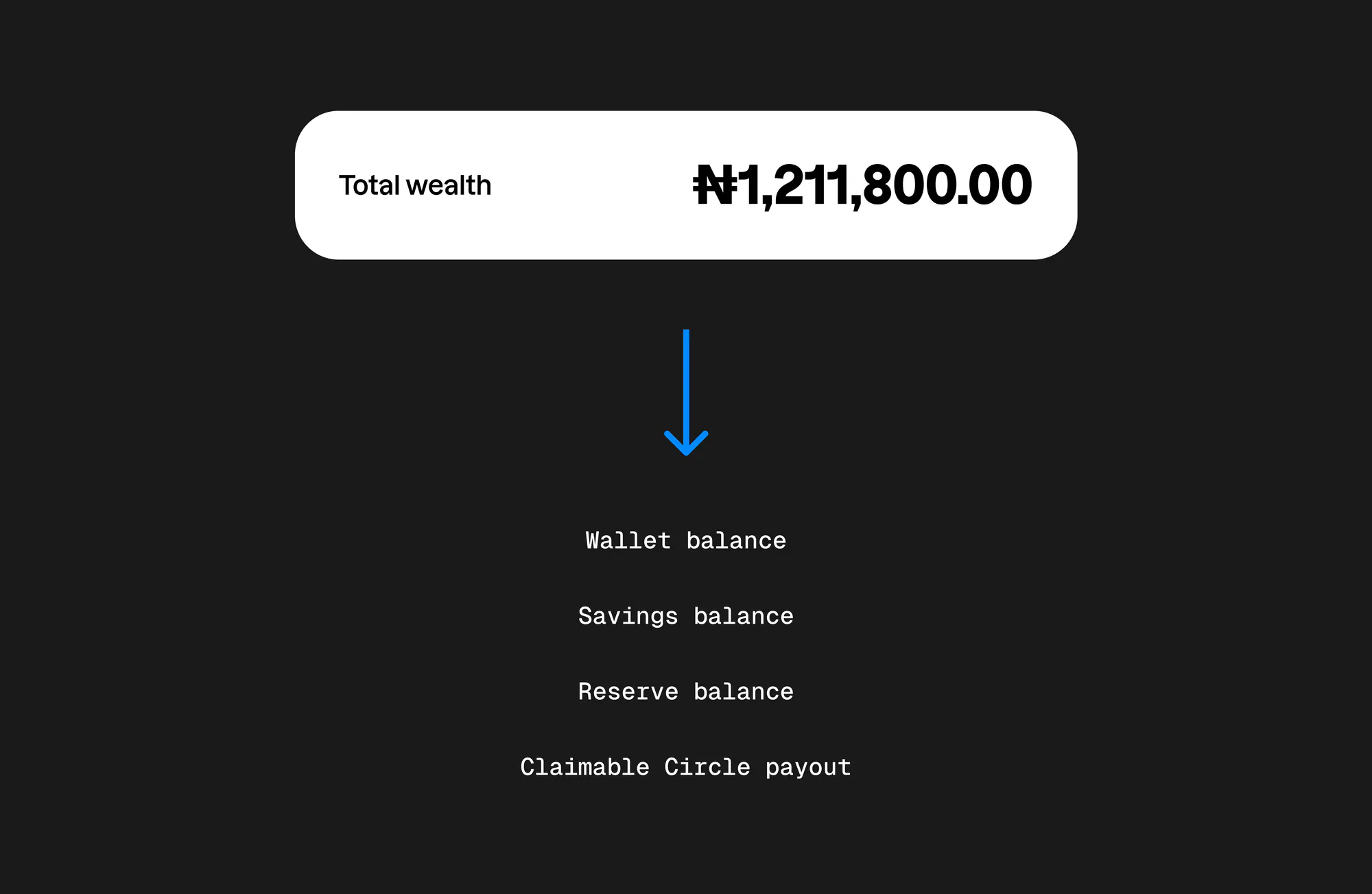
Adding Total Wealth made sense — Rank is more than a wallet. But it created a risk: if every possible amount counted, the dashboard could inflate what the user actually had. A future payout isn’t current wealth. An overdue contribution isn’t wealth. A completed Circle shouldn’t add value.
So the rule: Total Wealth only includes money the user owns or can access — wallet, Savings, Reserve, and a payout that’s ready to claim. Future payouts, next or overdue contributions, completed Circles, and Tribe counts don’t count yet.
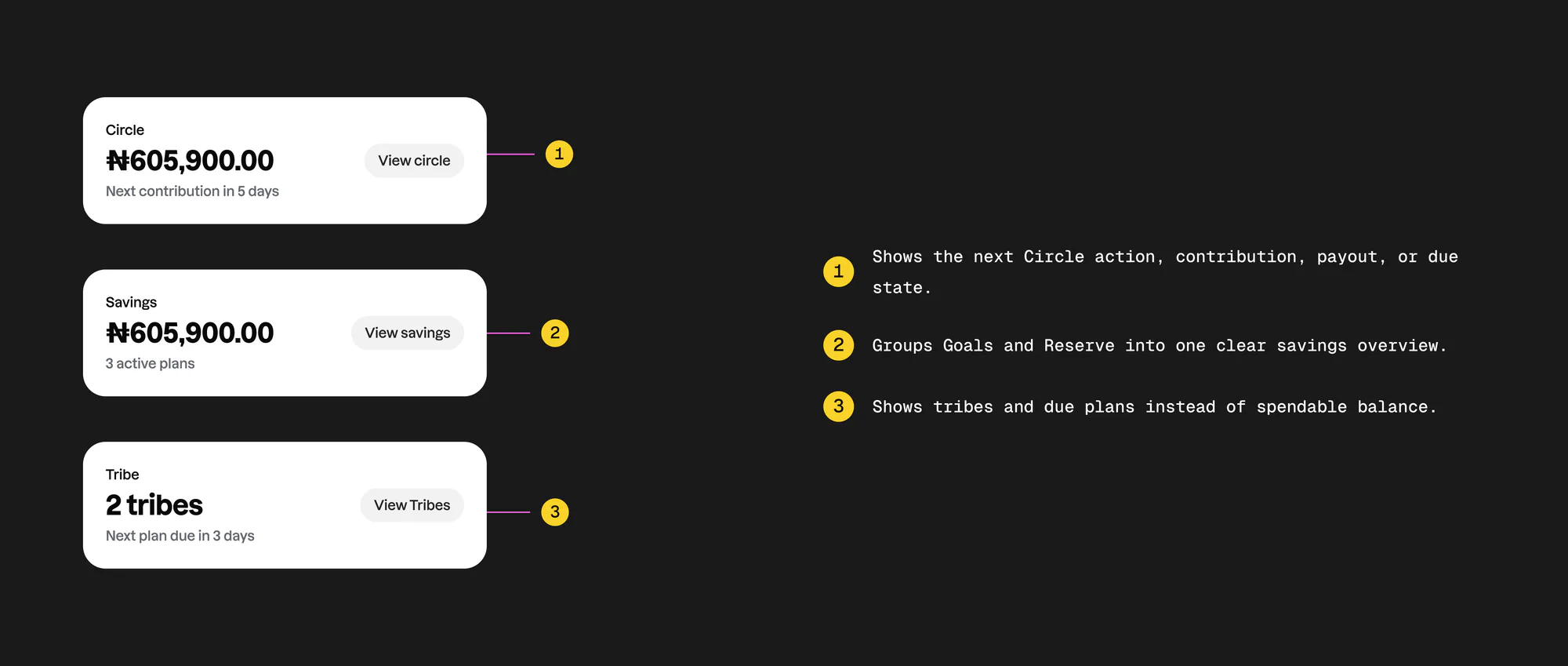
The cards needed visual consistency but not identical logic — each had to speak its product’s language. Cash is spendable, so its empty state helps you fund. Savings represents multiple plan types, so it shows total plus active plans, not just Goals. Tribe is group activity, not wallet value, so it shows tribes and due activity.
We deliberately removed balance framing from Tribe: “Tribe · ₦185,000” became “Tribe · 2 tribes · next plan due in 3 days,” because Tribe represents group activity, not spendable value.
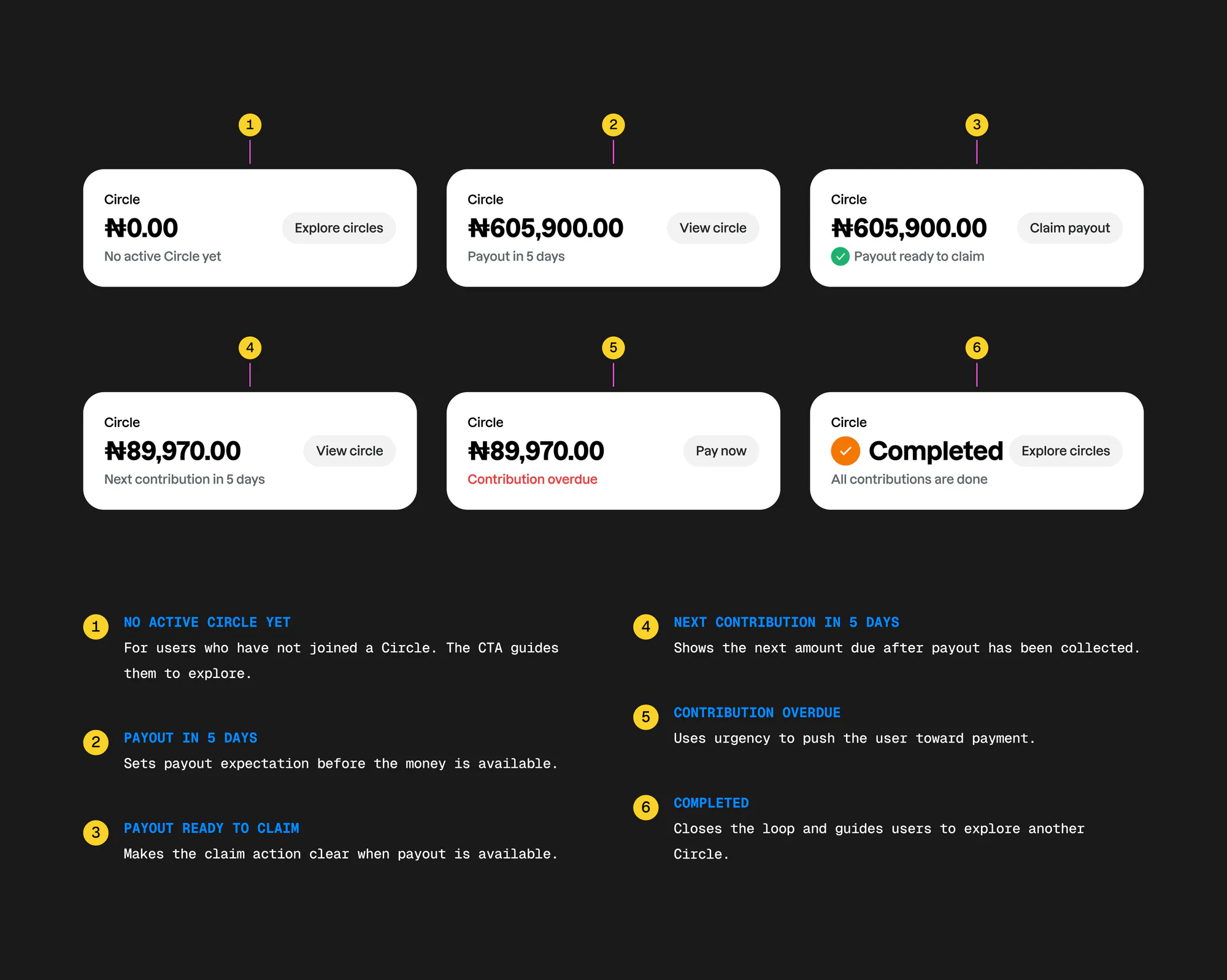
Circle looked like one card. It wasn’t. A single Circle card had to represent six realities: no active Circle, waiting for payout, payout ready to claim, contributions still owed after payout, overdue, and completed.
So it became a lifecycle component — each state shows the right value, the right message, and the right action: Explore Circles, View Circle, Claim Payout, Pay Now. Circle isn’t just money; it’s a timeline of obligations and opportunities, and the card shows what to understand or do at that exact moment.
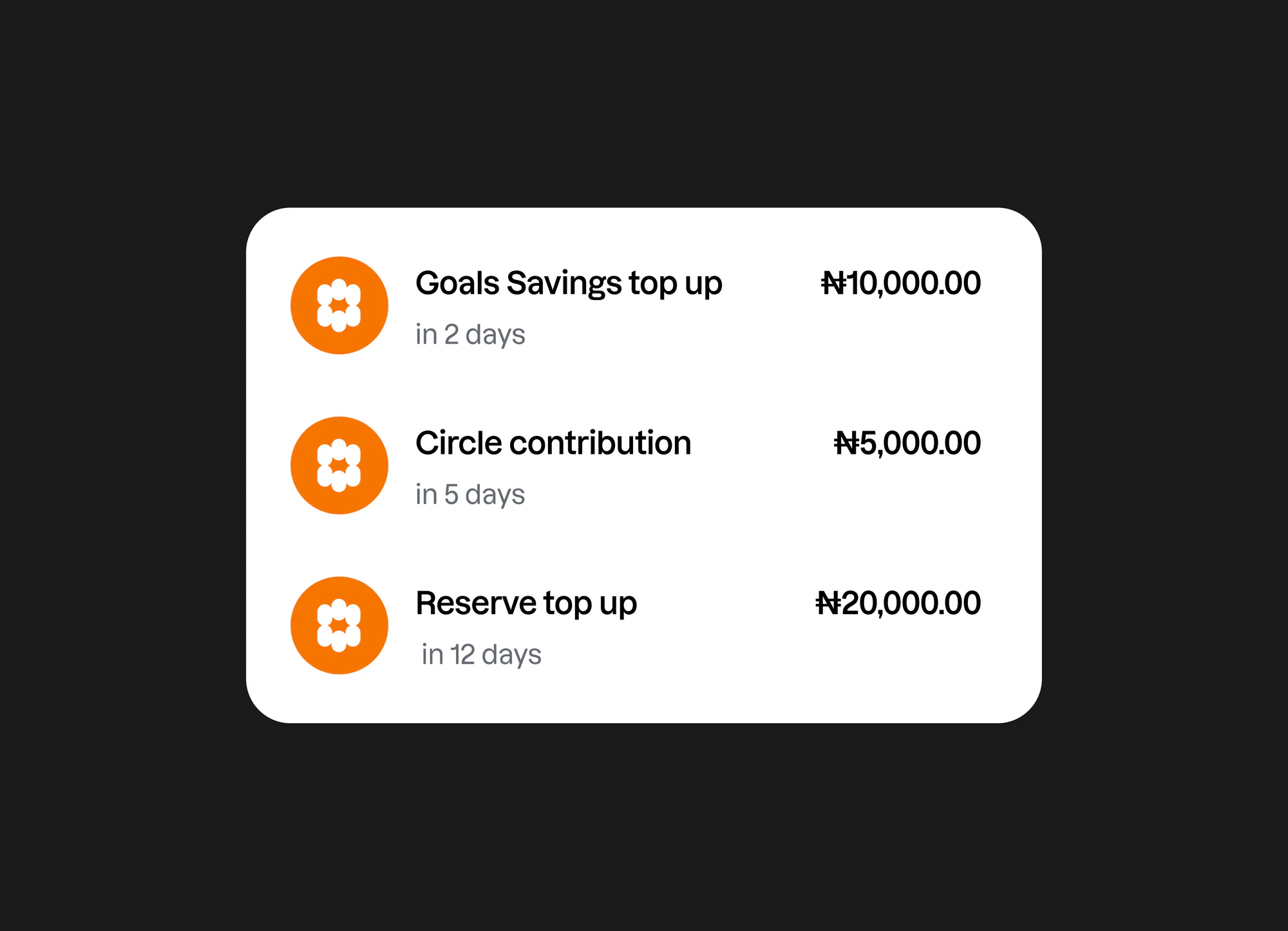
I explored giving Goals Savings its own section. It looked more visual, but Goals is only one savings type — if it got a section, Reserve and future plans would each need one too, making Home longer and harder to scale.
So future commitments collapsed into one planner: Upcoming payments. It holds Goals and Reserve top-ups, Circle contributions, expected Tribe contributions, overdue payments, and payout reminders — date-first, amount-ready, and able to grow without adding new Home sections.
Add is one of the most important actions on Home — when users tap it, they’re trying to fund their account. So Wallet details had to make account information easy to find, copy, and share.
It brings together wallet balance, account details, debit-card funding, bank name, account number and name, share details, and other funding options — with copy beside each field and secondary accounts visible but not dominant.
As Rank grows, different users will care about different parts of Home. So we added a Customize homepage flow that lets users reorder sections by dragging, while keeping the financial foundation fixed. Account balance and core actions stay in place. Everything else can move based on what matters most to the user.
New user guided tutorial
A new user Home can look empty at first. No savings, no Circle, no Tribe, no transactions, no upcoming payments.
Instead of leaving users to figure things out alone, I added a lightweight guided tutorial that introduces the most important parts of Home in context.
The goal was not to explain every feature. It was to help users understand what to do first, why each section matters, and how Home will become more useful as they start using Rank.
The tutorial highlights Add money, Hide balance, Savings, and Upcoming payments, then lets users replay it if they need a reminder.
Impact
I won’t frame this with fake conversion numbers — the real value was product clarity. Home matched Rank’s direction: it felt like a wealth dashboard, not just a wallet. The team got clearer product rules: Tribe is not a balance, Circle has lifecycle states, Total Wealth only includes accessible value, Upcoming payments is the planner, hide balance is global.
Engineering got clearer state logic across empty, filled, hidden, overdue, payout, setup, and reorder states. The dashboard became more scalable — new plan types feed into Upcoming payments instead of spawning new sections. And new users got a clearer path from a ₦0 account to their first action.
Lessons learned
A dashboard is only as good as its product logic. The hard part wasn’t arranging cards — it was deciding what each card should mean. Empty states should create momentum: a new user with ₦0 shouldn’t feel stuck. Privacy has to be complete: if balance is hidden, the whole money context respects it.
Good feedback protects the system: the questions around Goals and Tribe prevented framing problems that would have been harder to fix later. And personalization needs guardrails — control, but not enough to break the financial structure.
Final reflection
This started as a Home screen update. It became a product-clarity exercise. The more we worked through the screen, the more we had to define what Rank’s Home should represent — not just money in a wallet, but money in motion: savings being built, contributions coming up, payouts waiting to be claimed, Tribe activity with friends, and a new user taking their first steps.
The final Home gives Rank a stronger foundation for the product it’s becoming: a money system for people building wealth together.